9 Best Laser Printers With a Built-In Scanner (October 2026)
The best laser printers with scanners include the Brother DCP-L2640DW for busy small offices, the Brother MFC-L2820DW for scanning and faxing, and the HP LaserJet Pro MFP 3101sdw for small teams.
On this page (5 sections)
The Brother DCP-L2640DW is the best laser printer with a scanner for most small offices, pairing a 50-page automatic document feeder with automatic two-sided printing and dual-band wireless. The Brother MFC-L2820DW adds fax, while the Canon MF462dw II scans two-sided originals in one pass.
A scanner can turn a basic printer into a useful home-office tool, but the right setup depends on what you scan. A flatbed handles occasional pages; an automatic document feeder saves effort on longer stacks.
These picks are monochrome printers. They can scan and copy documents, but they won't print color pages.
If you're still deciding whether a laser model fits your household, our guide to the best home laser printers compares other home needs. You can also read whether laser printers are worth it for a typical home and how Brother laser printers compare.
Our picks at a glance
-
1

-
2

-
3

How we chose laser printers with scanners
We compared the listed scan and copy functions, document-feeder details, print speed, connections and two-sided features. Our score weighs specs and features against what you're shopping for.
A feeder matters most when you scan or copy several pages at a time. The Brother DCP-L2640DW, Brother MFC-L2820DW and HP LaserJet Pro MFP 3101sdw each have a 50-page feeder, while the HP M234sdw has a 40-page feeder.
Two-sided document scanning is a separate convenience from automatic two-sided printing. The Canon MF462dw II's feeder scans both sides in one pass, while automatic duplex printing appears on several picks.
Connections also shape daily use. Wireless options help if more than one device needs access, while USB can suit a printer connected to one computer.
| Product | Best for | Functions | Document feeder | Print speed | Our score |
|---|---|---|---|---|---|
| Brother DCP-L2640DW | busy small offices | Print, copy and scan | 50 pages | Up to 36 ppm | 9.3 |
| Brother MFC-L2820DW | scanning and faxing | Print, copy, scan and fax | 50 pages | Up to 34 ppm | 9.0 |
| HP LaserJet Pro MFP 3101sdw | small teams | Print, scan and copy | 50 sheets | Up to 35 ppm | 8.7 |
| Canon imageCLASS MF462dw II | two-sided scanning | Print, scan, copy and fax | 50 sheets, duplex one pass | Up to 37 ppm | 8.6 |
| Brother HL-L2480DW | a flatbed scan glass | Print, copy and scan | Flatbed scan glass | Up to 36 ppm | 8.4 |
| HP LaserJet MFP M234sdw | two-sided print jobs | Print, scan and copy | 40 pages | Up to 30 ppm | 8.3 |
| HP LaserJet MFP M140w | the smallest work areas | Print, scan and copy | Not specified | Up to 21 ppm | 8.0 |
| Canon imageCLASS MF273dw | automatic two-sided printing | Print, copy and scan | Not specified | Up to 30 ppm | 7.7 |
| Canon imageCLASS MF3010 VP | a wired USB setup | Print, scan and copy | Not specified | Up to 19 ppm | 7.0 |
The best laser printers with a built-in scanner
The Brother DCP-L2640DW is the strongest all-around pick here for multi-page scanning and everyday monochrome printing. The other models fit different needs, from fax to a small footprint or wired USB use.
Brother DCP-L2640DW: Best for busy small offices
- Print, copy and scan
- 50-page automatic document feeder
- Automatic duplex printing
- Dual-band wireless, Ethernet and USB
A 50-page feeder handles multi-page scan and copy jobs, and dual-band wireless, Ethernet and USB give you several connection options.
Pros
- 50-page automatic document feeder
- Automatic two-sided printing
- Dual-band wireless and Ethernet
Cons
- Monochrome printing only
- No fax function
The DCP-L2640DW combines printing, copying and scanning in a compact monochrome unit. Its 50-page automatic document feeder helps with multi-page jobs, and automatic duplex printing can put content on both sides of a sheet.
Brother gives it dual-band wireless, Ethernet and USB connections. The stated print speed is up to 36 pages per minute, and the paper tray holds 250 sheets.
This model suits a small office that scans multi-page documents but doesn't need fax. For a wireless setup, our Brother printer Wi-Fi connection guide can help you plan the next step.
Brother MFC-L2820DW: Best for scanning and faxing
- Print, copy, scan and fax
- 50-page automatic document feeder
- 2.7 in touchscreen
- Dual-band wireless, Ethernet and USB
This compact monochrome all-in-one adds fax and a 2.7 in touchscreen to the same 50-page feeder and flexible connections.
Pros
- Scans, copies and faxes multi-page jobs
- 50-page automatic document feeder
- Touchscreen supports cloud app access
Cons
- Monochrome printing only
- Fax adds a function some homes won't need
The MFC-L2820DW adds fax to print, copy and scan functions. Its 50-page feeder handles multi-page jobs, and a 2.7 in touchscreen provides access to cloud-based apps such as Google Drive and Dropbox.
Dual-band wireless, Ethernet and USB give you several connection options. Automatic duplex printing is included, and the stated print speed is up to 34 pages per minute.
Choose it when fax belongs in your routine or when you want a touchscreen for printer tasks. If you only need print, scan and copy, the DCP-L2640DW is a simpler match.
HP LaserJet Pro MFP 3101sdw: Best for small teams
- Print, scan and copy
- 50-sheet automatic document feeder
- Automatic two-sided printing
- 250-sheet input tray
A 50-sheet feeder, automatic two-sided printing and a 250-sheet input tray suit a small team handling regular document jobs.
Pros
- 50-sheet automatic document feeder
- Automatic two-sided printing
- Wireless, Ethernet and USB
Cons
- Monochrome printing only
- HP cartridges require HP chips or circuitry
The HP LaserJet Pro MFP 3101sdw is designed for small teams printing black-and-white documents. It has a 50-sheet automatic document feeder, automatic two-sided printing and a 250-sheet input tray.
HP gives this model wireless printing plus Ethernet and USB. Its stated print speed is up to 35 pages per minute, making it a fit for a shared work area with regular document jobs.
HP says this printer works only with cartridges that have HP chips or circuitry. Factor that cartridge requirement into your choice if you want flexibility in replacement supplies.
Canon imageCLASS MF462dw II: Best for two-sided scanning
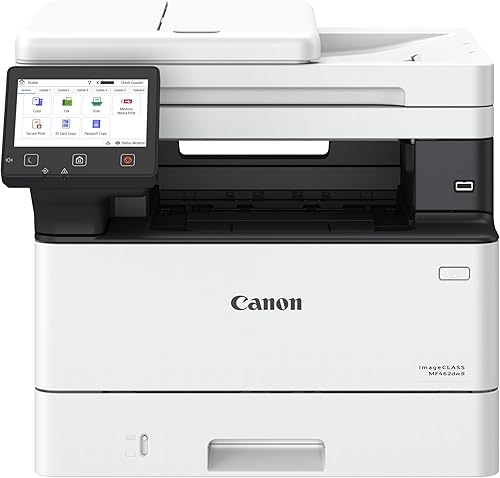
- Print, scan, copy and fax
- 50-sheet one-pass duplex ADF
- 5 in color touchscreen
- 250-sheet cassette plus 100-sheet multipurpose tray
Its 50-sheet document feeder scans both sides in one pass, a useful fit for two-sided originals and frequent office scanning.
Pros
- One-pass two-sided scanning
- 5 in color touchscreen
- Fax and expandable paper capacity
Cons
- Monochrome printing only
- Larger and heavier than compact options
The Canon imageCLASS MF462dw II stands out for one-pass two-sided scanning. Its 50-sheet automatic document feeder scans both sides of a document in one pass, and the printer also copies and faxes.
A 5 in color touchscreen provides access to customizable controls. The paper setup includes a 250-sheet cassette and a 100-sheet multipurpose tray, with an optional cassette available for added capacity.
This is a larger, heavier machine than the compact picks, so plan desk space before choosing it. It suits a small office that scans double-sided originals and wants fax in the same device.
Brother HL-L2480DW: Best for a flatbed scan glass

- Print, copy and scan
- Flatbed scan glass
- 2.7 in touchscreen
- Dual-band wireless, Ethernet and USB
The flatbed scan glass suits occasional scanning when you don't need a document feeder, and the compact monochrome unit also copies.
Pros
- Flatbed scan glass
- Automatic two-sided printing
- Touchscreen with cloud app access
Cons
- No automatic document feeder
- Monochrome printing only
The Brother HL-L2480DW uses a flatbed scan glass rather than an automatic document feeder. That setup suits single pages, books or small originals that you place on the glass one at a time.
It also copies and prints, with a 2.7 in touchscreen and dual-band wireless, Ethernet and USB. Automatic duplex printing is included, and its stated speed is up to 36 pages per minute.
Choose this model if scanning is occasional and you prefer the flatbed approach. For frequent multi-page work, a feeder-equipped printer will save more handling.
HP LaserJet MFP M234sdw: Best for two-sided print jobs

- Print, scan and copy
- 40-page automatic document feeder
- Automatic duplex printing
- Dual-band Wi-Fi and Ethernet
A 40-page feeder supports hands-free multi-page scan and copy jobs, while automatic duplex printing handles two-sided output.
Pros
- 40-page automatic document feeder
- Automatic two-sided printing
- Ethernet and dual-band Wi-Fi
Cons
- Monochrome printing only
- HP cartridges require HP chips or circuitry
The HP LaserJet MFP M234sdw pairs scanning and copying with a 40-page automatic document feeder. Automatic duplex printing handles two-sided output, and the printer supports dual-band Wi-Fi and Ethernet.
Its stated print speed is up to 30 pages per minute for single-sided pages. The HP Smart app supports scanning to the cloud and printing or copying from a smartphone.
HP says the printer requires cartridges with HP chips or circuitry. This is a practical pick for a small team that wants a feeder and automatic two-sided printing in a monochrome device.
HP LaserJet MFP M140w: Best for the smallest work areas

- Print, scan and copy
- Compact 14.2 x 10.4 x 7.8 in dimensions
- Wireless printing
- ID card copying
Its small stated dimensions fit tighter work areas, and its scan and copy functions cover basic document needs.
Pros
- Small stated footprint
- Wireless printing
- Copies both sides of ID cards onto one sheet
Cons
- No automatic duplex printing
- HP cartridges require HP chips or circuitry
The HP LaserJet MFP M140w is the smallest option here by its stated dimensions: 14.2 in wide, 10.4 in deep and 7.8 in high. It prints, scans and copies, and wireless printing supports mobile devices and computers.
Its stated print speed is up to 21 pages per minute. It does not have automatic duplex printing, so you'll need to handle two-sided output yourself.
This model suits a tight desk and basic document tasks. HP says it works only with cartridges that have original HP chips or circuitry.
Canon imageCLASS MF273dw: Best for automatic two-sided printing
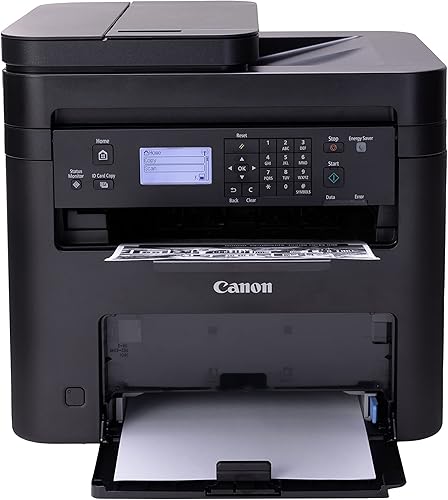
- Print, copy and scan
- Automatic two-sided printing
- Wireless connection
- Up to 30 ppm
Automatic two-sided printing and wireless connectivity make this a simple monochrome choice for regular home or small-office documents.
Pros
- Automatic two-sided printing
- Wireless 3-in-1 functions
- Up to 30 ppm
Cons
- Document feeder capacity is not specified
- Monochrome printing only
The Canon imageCLASS MF273dw offers wireless print, copy and scan functions with automatic two-sided printing. Its stated print speed is up to 30 pages per minute, and its first print time is about 5.3 seconds.
The available details don't specify an automatic document feeder, so don't assume it will take a stack of pages for scanning. It suits a buyer who wants duplex output and wireless access, with scanning needs that are more occasional.
Canon imageCLASS MF3010 VP: Best for a wired USB setup

- Print, scan and copy
- USB cable included
- 150-sheet paper capacity
- Color scanning
The included USB cable supports a direct computer connection, and the scanner can capture color documents.
Pros
- USB cable included
- Color scanning
- 150-sheet paper capacity
Cons
- Wired connection
- Lower stated print speed than the other picks
The Canon imageCLASS MF3010 VP is a wired monochrome all-in-one with color scanning and a USB cable included. It can print, scan and copy, and its paper capacity is up to 150 sheets.
Its stated print speed is up to 19 pages per minute. Choose it for a direct computer connection and basic document scanning, rather than shared wireless use or faster printing.
Which scanner setup fits your documents?
An automatic document feeder is the better fit for repeated multi-page jobs, while a flatbed works well when you scan one page at a time. The Canon MF462dw II is the clearest choice here for double-sided originals because its feeder scans both sides in one pass.
For a regular stack of single-sided pages, the Brother DCP-L2640DW, Brother MFC-L2820DW or HP MFP 3101sdw each offer a 50-page feeder. The HP M234sdw's 40-page capacity can suit smaller batches.
For books, receipts or delicate pages that you want to place individually, the Brother HL-L2480DW has a flatbed scan glass. The features don't specify an automatic feeder for the Canon MF273dw or Canon MF3010 VP, so check the scan setup carefully before choosing one for batch work.
Do you need fax, wireless or duplex printing?
Fax is useful if you still send documents through a phone line, and the Brother MFC-L2820DW and Canon MF462dw II include it. The other picks focus on printing, scanning and copying.
Wireless helps when several devices need to use the same printer. The Brother models here offer dual-band wireless, Ethernet and USB, while the HP M140w is wireless and the Canon MF3010 VP is wired.
Automatic duplex printing saves manual steps when you print both sides of a document. It does not mean the scanner can scan both sides at once, so look for a specific duplex scanning feature if that matters.
Verdict: choose by the pages you scan
For the best laser printer with a scanner for most small offices, pick the Brother DCP-L2640DW for its 50-page feeder, duplex printing and flexible connections. Choose the MFC-L2820DW if fax matters, the Canon MF462dw II for one-pass two-sided scanning, or the HP M140w when desk space is tight.
Our top 3 picks at a glance
-
1
-
2
-
3
Frequently asked questions
What should I look for in a laser printer with a scanner?
Match the scanner setup to the pages you handle. A flatbed works for occasional single pages, while an automatic document feeder helps with multi-page jobs.
For two-sided originals, check whether the feeder scans both sides in one pass.
Also consider whether you need fax, wireless connections or automatic two-sided printing.
Do laser printers with scanners scan in color?
Some monochrome laser all-in-ones can scan color originals even though they print only in black and white. The Canon MF3010 VP, for example, supports color scanning.
Check the scan function separately from the print color before you choose a printer for photos or color records.
Is an automatic document feeder worth having?
An automatic document feeder helps when you regularly scan or copy several pages at once. These models include feeders ranging from 40 to 50 pages, while the Brother HL-L2480DW uses a flatbed scan glass.
For occasional single pages, a flatbed may be enough.
Can a laser printer scan both sides of a page?
Yes, some all-in-one models can scan both sides automatically. The Canon MF462dw II has a 50-sheet feeder that scans both sides in one pass.
Automatic duplex printing is a separate feature, so confirm both functions if you need two-sided scanning and printing.
Do these laser printers print in color?
The nine picks here are monochrome printers, so they print in black and white. Some can still scan color originals.
If you need color printouts, compare a color all-in-one such as the options in our color laser all-in-one guide.


