9 Best Monochrome Laser Printers for Everyday Pages (October 2026)
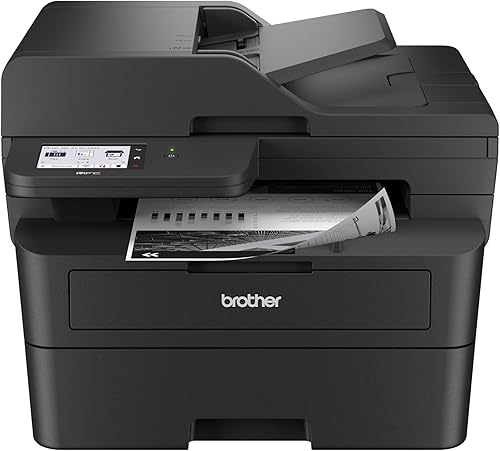
The best monochrome laser printers include the Brother DCP-L2640DW for everyday scanning and copying, the Brother HL-L2460DW for fast home office printing, and the Brother MFC-L2900DW for multi-page office workflows.
On this page (12 sections)
- How we chose these monochrome laser printers
- Compare the best monochrome laser printer picks
- 1. Brother DCP-L2640DW: Best for everyday scanning and copying
- 2. Brother HL-L2460DW: Best for fast home office printing
- 3. Brother MFC-L2900DW: Best for multi-page office workflows
- 4. Canon imageCLASS MF462dw II: Best for a touchscreen office setup
- 5. HP LaserJet Pro 3001dw: Best for a small connected team
- 6. Brother HL-L2405W: Best for simple home printing
- 7. Canon imageCLASS LBP122dw: Best for compact two-sided printing
- 8. Brother HL-6210DW: Best for high-volume office pages
- 9. HP LaserJet M207dw: Best for a small printer footprint
- Which monochrome laser printer fits your routine?
The Brother DCP-L2640DW is the best monochrome laser printer for most everyday needs because it prints, scans and copies, with automatic duplex printing and a 50-page feeder. For print-only work, the Brother HL-L2460DW offers the same stated 36 ppm speed with a 250-sheet tray.
For a simpler printer that only handles pages, the best home laser printer picks can help narrow the choice by household needs. If you're still weighing laser against inkjet, read whether a laser printer is worth it for a typical home.
Our picks at a glance
-
1

-
2

-
3
How we chose these monochrome laser printers
The best monochrome laser printer for everyday pages should match your print volume, need for scanning, and preferred connection. We compared the listed functions, print speeds, paper handling, duplex features and connection options.
A print-only model is enough if you mainly print forms, schoolwork or office documents. An all-in-one costs desk space, but can replace separate scanning and copying steps.
We included models for light home use, shared home offices and higher-volume teams.
Our score weighs specs, features and buyer feedback against what you're shopping for.
Compare the best monochrome laser printer picks
The Brother DCP-L2640DW combines print, scan and copy functions, while the HL-L2460DW keeps the setup focused on printing. For a print-only model at a lower speed, the HL-L2405W has wireless connectivity and a 250-sheet tray.
| Product | Best for | Functions | Print speed | Connections | Our score |
|---|---|---|---|---|---|
| Brother DCP-L2640DW | everyday scanning and copying | Print, scan and copy | Up to 36 ppm | Dual-band wireless, Ethernet and USB | 9.3 |
| Brother HL-L2460DW | fast home office printing | Print only | Up to 36 ppm | Dual-band wireless, Ethernet and USB | 9.2 |
| Brother MFC-L2900DW | multi-page office workflows | Print, scan, copy and fax | Up to 36 ppm | Dual-band wireless, Ethernet and USB | 8.6 |
| Canon imageCLASS MF462dw II | a touchscreen office setup | Print, scan, copy and fax | Up to 37 ppm | Wireless and USB | 8.6 |
| HP LaserJet Pro 3001dw | a small connected team | Print only | Up to 35 ppm | Wireless, Ethernet and Bluetooth | 8.5 |
| Brother HL-L2405W | simple home printing | Print only | Up to 30 ppm | Dual-band wireless and USB | 8.7 |
| Canon imageCLASS LBP122dw | compact two-sided printing | Print only | Up to 30 ppm | Wireless and Ethernet | 8.2 |
| Brother HL-6210DW | high-volume office pages | Print only | Up to 50 ppm | Dual-band wireless and Gigabit Ethernet | 7.8 |
| HP LaserJet M207dw | a small printer footprint | Print only | Up to 28 ppm | Dual-band Wi-Fi, Ethernet and USB | 7.8 |
1. Brother DCP-L2640DW: Best for everyday scanning and copying
The Brother DCP-L2640DW is the best all-around pick if your everyday pages include documents you also need to copy or scan. It prints up to 36 ppm and includes automatic duplex printing.
Brother DCP-L2640DW: Best for everyday scanning and copying
- Print, scan and copy
- Up to 36 ppm
- 50-page automatic document feeder
- Automatic duplex printing
This compact all-in-one pairs everyday printing with scanning and copying. Its 50-page feeder can help with multi-page jobs.
Pros
- Automatic duplex printing
- 50-page document feeder
- Wireless, Ethernet and USB connections
Cons
- Larger than the print-only compact models
- Fax is not listed as a function
The 50-page automatic document feeder helps with multi-page copying and scanning. Brother also gives it dual-band wireless, Ethernet and USB, so you can choose a network connection or connect one computer directly.
Its compact all-in-one design suits a desk where one device needs to handle several tasks. Choose it if the feeder and copy function would save steps; skip it if you only need a printer.
2. Brother HL-L2460DW: Best for fast home office printing
The Brother HL-L2460DW is a strong print-only choice for home offices that want speed, automatic duplexing and a 250-sheet tray. Its stated print speed is up to 36 ppm.
Brother HL-L2460DW: Best for fast home office printing
- Print only
- Up to 36 ppm
- Automatic duplex printing
- 250-sheet tray
A print-only choice with automatic two-sided printing, a 250-sheet tray and several connection options. It suits a desk where scanning and copying are handled elsewhere.
Pros
- Automatic duplex printing
- 250-sheet tray
- Wireless, Ethernet and USB connections
Cons
- No built-in scanner or copier
- Taller than the HL-L2405W
It connects through dual-band wireless, Ethernet or USB, and the manual feed slot can handle envelopes and specialty paper. Because it has no scanner or copier, it leaves those tasks to another device.
Automatic duplex printing can reduce paper use on longer documents. See our guide to what duplex means on a printer if you want to compare automatic and manual two-sided printing.
3. Brother MFC-L2900DW: Best for multi-page office workflows
The Brother MFC-L2900DW suits a small office that needs printing, scanning, copying and faxing in one machine. It prints up to 36 ppm and has a 50-page feeder.
Brother MFC-L2900DW: Best for multi-page office workflows
- Print, scan, copy and fax
- Up to 36 ppm
- 50-page automatic document feeder
- Single-pass two-sided scanning
This all-in-one adds fax and single-pass two-sided scanning to everyday printing. Its touchscreen also gives access to cloud services.
Pros
- 50-page document feeder
- Single-pass two-sided scanning
- 3.5 in touchscreen
Cons
- Larger footprint than print-only models
- Fax may be unnecessary for some homes
For double-sided paperwork, its single-pass two-sided scanning can capture both sides in one pass. Automatic duplex printing, a 250-sheet tray and a 3.5 in touchscreen round out its document features.
The machine also offers dual-band wireless, Ethernet and USB. Consider it when fax and two-sided scanning are useful parts of your routine, since a print-only model would take less space and cover the simpler job.
4. Canon imageCLASS MF462dw II: Best for a touchscreen office setup
The Canon imageCLASS MF462dw II pairs print, scan, copy and fax functions with a 5-inch color touchscreen. It prints up to 37 ppm and supports automatic two-sided printing.
Canon imageCLASS MF462dw II: Best for a touchscreen office setup
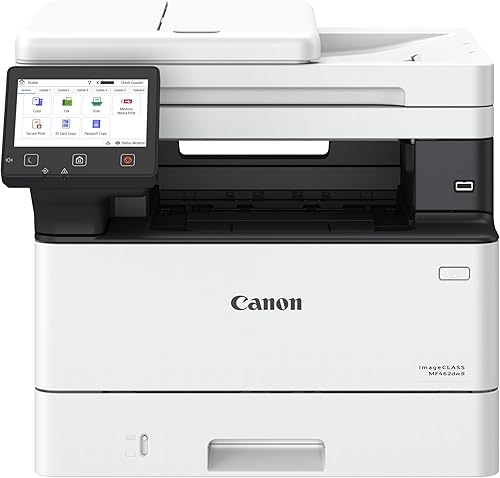
- Print, scan, copy and fax
- Up to 37 ppm
- 5-inch color touchscreen
- Two-sided 50-sheet feeder
Canon combines a color touchscreen with automatic two-sided printing and a feeder that scans both sides in one pass. The paper capacity can expand with an optional cassette.
Pros
- Up to 37 ppm
- 5-inch color touchscreen
- Two-sided 50-sheet document feeder
Cons
- Weighs 46.6 lb
- Optional paper cassette is sold separately
Its 50-sheet automatic feeder scans both sides in one pass. Paper capacity starts with a 250-sheet cassette and a 100-sheet multipurpose tray, and can expand with an optional cassette.
At 46.6 lb, it is the heaviest printer in this group. Choose it when the touchscreen, feeder and expandable paper setup matter more than easy repositioning.
5. HP LaserJet Pro 3001dw: Best for a small connected team
The HP LaserJet Pro 3001dw is designed for small teams of up to 7 people that mainly print black-and-white pages. It prints up to 35 ppm and includes automatic two-sided printing.
HP LaserJet Pro 3001dw: Best for a small connected team

- Print only
- Up to 35 ppm
- Automatic duplex printing
- Wireless, Ethernet and Bluetooth
This print-only HP is aimed at teams of up to 7 people. Automatic two-sided printing and multiple connection choices suit shared document work.
Pros
- Automatic duplex printing
- Wireless, Ethernet and Bluetooth
- HP Wolf Pro Security
Cons
- Print only, without built-in scanning or copying
- Cartridges require original HP chips or circuitry
Wireless, Ethernet and Bluetooth connections support different desk or network setups. HP also includes Wolf Pro Security features, which may suit a team that wants security controls on its printer.
It is print-only, so choose another model if you need scanning or copying at the machine. HP says this printer works only with cartridges using original HP chips or circuitry.
6. Brother HL-L2405W: Best for simple home printing
The Brother HL-L2405W is a compact home printer for one-sided pages, with wireless printing and a 250-sheet tray. Its speed is up to 30 ppm.
Brother HL-L2405W: Best for simple home printing

- Print only
- Up to 30 ppm
- Dual-band wireless and USB
- 250-sheet tray
A compact print-only option for everyday home pages, with a 250-sheet tray and mobile printing. Its duplex setting is manual, so it won't automatically print both sides.
Pros
- 250-sheet tray
- Dual-band wireless
- Manual feed for envelopes and specialty paper
Cons
- Manual rather than automatic duplex
- No Ethernet connection
It connects through dual-band wireless or USB, and its manual feed slot supports envelopes and specialty paper. Duplex printing is manual, so printing on both sides takes an extra step.
Choose it for straightforward printing where automatic two-sided output is not a priority. If paper use matters and you print long documents, the automatic duplex feature on the Brother HL-L2460DW may be a better fit.
7. Canon imageCLASS LBP122dw: Best for compact two-sided printing
The Canon imageCLASS LBP122dw offers print-only monochrome output, automatic duplex printing and a compact design. It prints up to 30 ppm.
Canon imageCLASS LBP122dw: Best for compact two-sided printing

- Print only
- Up to 30 ppm
- Automatic duplex printing
- Compact design
This compact Canon handles print-only work and automatic two-sided pages. Its 150-sheet paper capacity is smaller than the 250-sheet trays on several other picks.
Pros
- Automatic duplex printing
- Compact design
- Mobile printing through Canon apps
Cons
- 150-sheet capacity
- No built-in scanner or copier
Its paper capacity is up to 150 sheets, below the 250-sheet trays on several other models here. Wireless printing and mobile app support help with a home desk setup.
Choose this Canon when automatic two-sided printing matters and you don't need scanning or copying. Check the printer's dimensions against your available desk space before you settle on a spot.
8. Brother HL-6210DW: Best for high-volume office pages
The Brother HL-6210DW is built for high-volume monochrome work, with print speeds up to 50 ppm. Its main tray holds 520 sheets, with another 100-sheet multipurpose tray.
Brother HL-6210DW: Best for high-volume office pages

- Print only
- Up to 50 ppm
- 520-sheet main tray plus 100-sheet multipurpose tray
- Expandable capacity
This office-focused printer has the highest stated speed and paper capacity in this group. Its larger paper setup makes more sense for a busy shared workplace than occasional home pages.
Pros
- Up to 50 ppm
- 520-sheet main tray and 100-sheet multipurpose tray
- Expandable to 1,660 sheets with optional trays
Cons
- Large capacity may be unnecessary for home use
- Optional trays add to the setup
Optional trays can expand total capacity up to 1,660 sheets. Dual-band wireless and Gigabit Ethernet support shared office connections, and automatic duplex printing handles two-sided pages.
This capacity and speed are likely more than a typical home needs. Choose it when multiple people print regularly and frequent tray refills would disrupt the workday.
9. HP LaserJet M207dw: Best for a small printer footprint
The HP LaserJet M207dw is a print-only monochrome model with automatic duplex printing and a compact listed footprint. It prints up to 28 ppm.
HP LaserJet M207dw: Best for a small printer footprint

- Print only
- Up to 28 ppm
- Automatic duplex printing
- Dual-band Wi-Fi, Ethernet and USB
A compact HP option for everyday monochrome pages, with automatic duplex printing and several ways to connect. Its stated speed is lower than most other picks here.
Pros
- Automatic duplex printing
- Dual-band Wi-Fi with self-reset
- Wireless, Ethernet and USB
Cons
- Up to 28 ppm
- 150-sheet capacity
It supports dual-band Wi-Fi, Ethernet and USB. HP says its Wi-Fi can detect and resolve connection issues, and the printer includes security features.
Its 150-sheet capacity and lower stated speed suit modest print volumes better than a busy shared office. Consider it if the printer's compact size and automatic duplexing matter more than faster output.
Which monochrome laser printer fits your routine?
For one device that can print, scan and copy, choose the Brother DCP-L2640DW. The Brother HL-L2460DW is a better match when you only need printing and want a 250-sheet tray, automatic duplexing and a stated speed of up to 36 ppm.
For a shared office printing large batches, look at the Brother HL-6210DW's speed and capacity. If you're shopping on a tighter budget, compare the features in our best cheap laser printer guide before deciding which trade-offs fit your desk.
Our top 3 picks at a glance
-
1
-
2
-
3


