8 Best Cheap Laser Printers That Still Print Well (October 2026)
The best cheap laser printers include the Brother HL-L2460DW for frequent two-sided printing, the Brother HL-L2405W for basic wireless printing, and the HP LaserJet MFP M234sdw for scanning multi-page documents.
On this page (6 sections)
The best cheap laser printer for most home offices is the Brother HL-L2460DW, with automatic duplex, wireless and Ethernet connections, and a 250-sheet tray. Choose the HL-L2405W for basic wireless printing, or an all-in-one if scanning and copying are part of your routine.
A budget laser printer can handle school forms, shipping labels and work documents without adding color features you may not need. This roundup focuses on monochrome models, with picks for print-only setups and homes that also need a scanner or copier.
For more monochrome options, see our guide to the best monochrome laser printers. If you're choosing between a printer and another type, our home laser printer picks cover a wider range of household needs.
Our picks at a glance
-
1

-
2

-
3

Which cheap laser printers are the best picks?
The Brother HL-L2460DW is the most flexible choice here for frequent document printing, while the other models trade features, size or functions. Choose based on how you connect, whether you print both sides, and whether you need to scan or copy.
Brother HL-L2460DW: Best for frequent two-sided printing
- Automatic duplex printing
- Up to 36 pages per minute
- 250-sheet tray
- Wireless, Ethernet and USB
Automatic two-sided printing and a 250-sheet tray make this a flexible pick for frequent home office use. It connects by wireless, Ethernet or USB.
Pros
- Automatic duplex
- 250-sheet tray
- Wireless, Ethernet and USB
Cons
- Print only, with no scanner or copier
The Brother HL-L2460DW fits a home office that prints often and wants fewer manual steps. It combines automatic duplex printing, a 250-sheet tray and wireless, Ethernet and USB connections.
Brother lists print speeds up to 36 pages per minute. A manual feed slot supports envelopes and specialty paper, giving you another option beyond the main tray.
This is a print-only model, so it won't replace a scanner or copier. If you need those functions, compare it with the HP LaserJet MFP M234sdw below.
Choose it for regular two-sided documents and a flexible connection setup. The 250-sheet tray also suits a shared workspace where several people print during the day.
Brother HL-L2405W: Best for basic wireless printing
- Up to 30 pages per minute
- 250-sheet tray
- Dual-band wireless and USB
- Print only
This print-only Brother keeps the main setup simple, with wireless connectivity and a 250-sheet tray. It suits a home that does not need automatic duplexing.
Pros
- 250-sheet tray
- Dual-band wireless
- Manual feed slot for envelopes and specialty paper
Cons
- Duplex is manual
- No scanner or copier
The Brother HL-L2405W keeps the focus on everyday monochrome printing. It offers dual-band wireless, USB and a 250-sheet tray, with print speeds up to 30 pages per minute.
The key tradeoff is manual duplex. If you print on both sides often, you'll need to turn pages yourself; for mostly one-sided pages, that may be an acceptable way to keep the setup simple.
A manual feed slot supports envelopes and specialty paper. The printer handles printing only, so look at an all-in-one if you also need copies or scans.
Choose it for basic wireless printing with a larger tray. For a model with automatic two-sided printing, compare the Brother HL-L2460DW or Canon LBP122dw.
HP LaserJet MFP M234sdw: Best for scanning multi-page documents
- Print, scan and copy
- 40-page auto document feeder
- Automatic duplex
- Wireless and Ethernet
The auto document feeder and scan-and-copy functions suit a small team that handles multi-page paperwork. Wireless and Ethernet provide connection choices.
Pros
- 40-page auto document feeder
- Automatic duplex
- Print, scan and copy
Cons
- Larger than the compact print-only models here
The HP LaserJet MFP M234sdw is the pick for small teams that need a printer, scanner and copier in one device. Its 40-page auto document feeder helps with multi-page scanning and copying.
It prints up to 30 pages per minute on one side, with automatic two-sided printing also available. The model supports wireless and Ethernet connections, so you can choose the connection that fits your workspace.
This all-in-one is a better match for paperwork than a print-only model. For a compact alternative that also scans and copies, the HP M140w has a smaller set of features.
Choose it when documents need to move between paper and digital files. If you'll only print, the single-function picks take up fewer features in your budget.
Canon imageCLASS LBP122dw: Best for compact duplex printing

- Up to 30 pages per minute
- Automatic duplex
- Wireless and Ethernet
- Print only
Canon combines automatic two-sided printing with wireless and Ethernet connections in a print-only model. Its stated paper capacity is up to 150 sheets.
Pros
- Automatic duplex
- Wireless and Ethernet
- Compact design
Cons
- Print only, with no scanner or copier
The Canon imageCLASS LBP122dw brings automatic duplex to a print-only home setup. It prints up to 30 pages per minute and supports wireless and Ethernet connections.
Canon gives it a paper capacity of up to 150 sheets. That is less than the 250-sheet Brother options, but it may be enough if you print in shorter batches.
The printer uses Canon Genuine Toner 071 or 071 H. It also supports printing from mobile devices through Canon's app options.
Choose it for compact monochrome printing with automatic duplex. If paper capacity matters more than a smaller setup, compare the Brother models near the top of this list.
HP LaserJet MFP M140w: Best for a small scan-and-copy setup

- Print, scan and copy
- Up to 21 pages per minute
- Wireless printing
- Compact design
This compact HP adds scan and copy functions for a home that needs more than printing. It can also copy both sides of an ID card onto one side of a sheet.
Pros
- Print, scan and copy
- Compact design
- ID card copying
Cons
- No duplex printing
The HP LaserJet MFP M140w adds printing, scanning and copying in a compact design. Its print speed reaches up to 21 pages per minute, and it can copy both sides of an ID card onto one side of a sheet.
It supports wireless printing from mobile devices, PCs and tablets. The model does not offer duplex printing, so double-sided pages require a manual step.
HP says this printer works only with cartridges that use original HP chips or circuitry, and firmware updates maintain that restriction. Keep that cartridge requirement in mind when comparing ongoing supply choices.
Choose it if you want basic scan and copy tools in a compact printer. For multi-page scanning, the M234sdw's auto document feeder is a more useful fit.
HP LaserJet M207dw: Best for a compact duplex office printer

- Automatic duplex
- Up to 28 pages per minute
- Wireless, Ethernet and USB
- 150-sheet capacity
The M207dw is a print-only option with automatic duplex and several connection types. Its 150-sheet capacity is smaller than the Brother models above.
Pros
- Automatic duplex
- Wireless, Ethernet and USB
- 150-sheet capacity
Cons
- No scanner or copier
The HP LaserJet M207dw is a print-only model with automatic duplex and wireless, Ethernet and USB connections. It prints up to 28 pages per minute and has a 150-sheet capacity.
This mix suits a desk where you want two-sided printing without a scanner or copier. Its smaller tray may mean more refills than the 250-sheet Brother models if several people share it.
The HP app supports mobile printing, and the printer includes Auto-On/Auto-Off technology. For another compact print-only option, compare it with Canon's LBP122dw.
Choose it for a small office that needs automatic duplex and multiple connection types. If you need a larger paper tray, the HL-L2460DW or HL-L2405W offers 250 sheets.
Canon imageCLASS LBP6030w: Best for simple, compact printing
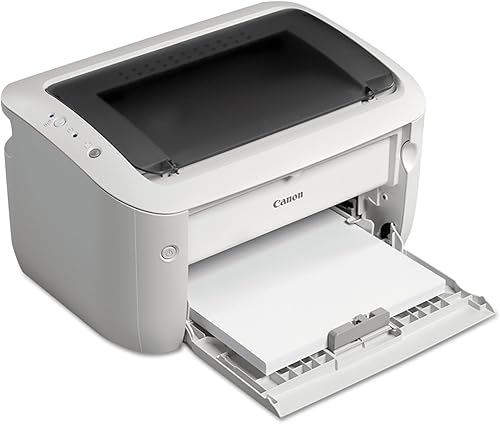
- Up to 19 pages per minute
- Wireless printing
- 150-sheet capacity
- Print only
This compact Canon handles basic monochrome printing with wireless connectivity and a 150-sheet capacity. It prints one side at a time.
Pros
- Compact design
- Wireless connectivity
- 150-sheet capacity
Cons
- No duplex printing
- No scanner or copier
The Canon imageCLASS LBP6030w suits simple, one-sided monochrome printing in a compact space. It prints up to 19 pages per minute and holds up to 150 sheets.
Wireless connectivity supports printing from compatible mobile devices. The tradeoff is that this model has no duplex printing and no scan or copy functions.
Canon says the printer uses Genuine Toner 125, with a stated yield of 1,600 pages. Toner yield can vary with what you print, so use that figure as a reference when comparing supplies.
Choose it for a compact setup that handles straightforward print jobs. If you want automatic duplex, consider the Canon LBP122dw or HP M207dw instead.
Canon imageCLASS MF3010 VP: Best for wired scanning and copying

- Print, scan and copy
- Up to 19 pages per minute
- USB cable included
- 150-sheet capacity
This Canon includes scanning and copying, plus a USB cable and 150-sheet capacity. Its listed system support includes Linux for print only.
Pros
- Print, scan and copy
- USB cable included
- ID card copying
Cons
- Wired setup
The Canon imageCLASS MF3010 VP combines monochrome printing with scanning and copying. It prints up to 19 pages per minute and has a paper capacity of up to 150 sheets.
This is a wired setup with a USB cable included. The product data also names Linux support for print only, alongside several Windows and Mac versions.
Its listed duplex function is automatic, but confirm how that applies to the specific print and copy tasks you plan to do. The HP M234sdw offers wireless connections and an auto document feeder for multi-page work.
Choose it if you want wired printing plus scan and copy functions. If wireless printing is a priority, look at the HP M140w or M234sdw.
How did we choose these cheap laser printers?
We compared print speed, duplex options, paper capacity, connections and extra functions against common home and small-office needs. Our score weighs specs, features and buyer feedback against what you're shopping for.
A useful budget printer should match your page routine. A large tray and automatic duplex can save repeat steps, while a smaller one-sided printer may fit a household that prints only now and then.
We included both print-only models and all-in-ones. That lets you compare the cost of adding scan and copy functions with the simpler setup of a printer made for output alone.
What should you compare in a budget laser printer?
The best cheap laser printer is the one that covers your regular tasks without features you won't use. Start with functions and duplex, then check connections, tray capacity and toner compatibility.
Do you need print only, or scan and copy too?
Print-only models are enough for documents, schoolwork and forms that arrive digitally. If you often handle paper forms or need copies of IDs, an all-in-one can avoid using a separate scanner or copier.
The HP M234sdw and M140w both print, scan and copy. The M234sdw adds an auto document feeder for multi-page work, while the M140w emphasizes a compact footprint and ID card copying.
Is automatic duplex worth it?
Automatic duplex prints both sides without asking you to turn the pages over. It can make long documents easier to manage and reduce the number of sheets used.
The HL-L2460DW, Canon LBP122dw and HP M207dw list automatic duplex. The HL-L2405W has manual duplex, while the HP M140w and Canon LBP6030w do not offer duplex printing.
For a clearer explanation of the feature, read what duplex means on a printer.
Which connections should you look for?
Choose connections that fit the devices and network you already use. Wireless helps with printing from mobile devices, while Ethernet can suit a shared desk setup and USB can connect a printer directly to one computer.
The Brother HL-L2460DW supports wireless, Ethernet and USB. The Canon MF3010 VP is a wired option, while the Brother HL-L2405W supports wireless and USB.
How much paper capacity do you need?
A larger paper tray means fewer refills when you print regularly. The two Brother models each list a 250-sheet tray, while the Canon LBP122dw, HP M207dw and Canon LBP6030w list capacities of up to 150 sheets.
Think about who will share the printer and how often you print. A smaller tray can be fine for occasional use, but a busy home office may prefer more room between refills.
What toner should you check before buying?
Check which toner family fits the printer before you choose. The Brother HL-L2460DW and HL-L2405W use TN830 or TN830XL toner, Canon models use their named Canon Genuine toner families, and HP models have their own cartridge requirements.
Toner yield is a guide, not a promise of the same number of pages for every user. Page coverage and print habits affect how often you'll need a replacement.
How do cheap laser printers compare?
The main differences are whether a model has automatic duplex, how much paper its tray holds, and whether it can scan and copy. Use the table to narrow the list before checking the model details above.
| Product | Best for | Print speed | Duplex | Functions | Our score |
|---|---|---|---|---|---|
| Brother HL-L2460DW | frequent two-sided printing | Up to 36 pages per minute | Automatic | Print only | 9.2 |
| Brother HL-L2405W | basic wireless printing | Up to 30 pages per minute | Manual | Print only | 8.7 |
| HP LaserJet MFP M234sdw | scanning multi-page documents | Up to 30 pages per minute | Automatic | Print, scan and copy | 8.3 |
| Canon imageCLASS LBP122dw | compact duplex printing | Up to 30 pages per minute | Automatic | Print only | 8.2 |
| HP LaserJet MFP M140w | a small scan-and-copy setup | Up to 21 pages per minute | No | Print, scan and copy | 8.0 |
| HP LaserJet M207dw | a compact duplex office printer | Up to 28 pages per minute | Automatic | Print only | 7.8 |
| Canon imageCLASS LBP6030w | simple, compact printing | Up to 19 pages per minute | No | Print only | 7.6 |
| Canon imageCLASS MF3010 VP | wired scanning and copying | Up to 19 pages per minute | Automatic | Print, scan and copy | 7.0 |
Is a cheap laser printer right for your home?
A cheap monochrome laser printer is a practical fit when most of your pages are text, forms or black-and-white documents. If you also want color output, look at our wireless color laser printer picks.
If you're unsure whether laser fits your household, our guide to whether laser printers are worth it covers the broader tradeoffs. For this list, choose by the work you do most often: print-only for straightforward output, automatic duplex for frequent double-sided pages, or an all-in-one for scans and copies.
Which cheap laser printer should you choose?
Pick the Brother HL-L2460DW if you want automatic duplex, a 250-sheet tray and several connection choices. Choose the HL-L2405W for basic wireless printing, or the HP M234sdw when multi-page scanning and copying matter.
For a smaller print-only setup, compare the Canon LBP122dw, HP M207dw and Canon LBP6030w by duplex and tray needs. If scanning is part of your routine, the best cheap laser printer for you may be an all-in-one, even if you print fewer pages per minute.
Our top 3 picks at a glance
-
1
-
2
-
3
Frequently asked questions
What is the best cheap laser printer for home use?
The Brother HL-L2460DW is a strong fit if you want automatic duplex printing, wireless and Ethernet connections, and a 250-sheet tray. For simpler one-sided printing, the Brother HL-L2405W keeps wireless and USB connections while skipping automatic duplex.
Choose an all-in-one model if scanning and copying matter.
Are cheap laser printers good for occasional printing?
A monochrome laser printer can suit occasional printing when most of your pages are text and forms. Decide whether you need only printing or also scanning and copying, then compare connection types and duplex options.
Toner costs and cartridge compatibility matter over time, so check replacements before you choose.
Do budget laser printers print on both sides?
Some do. The Brother HL-L2460DW, Canon LBP122dw and HP M207dw have automatic duplex, while the Brother HL-L2405W uses manual duplex.
If you often print long documents, automatic duplex can save the step of turning pages yourself.
Should I get a laser printer with a scanner?
Get an all-in-one if you regularly scan forms, copy IDs or make paper copies. The HP M234sdw adds a 40-page auto document feeder, while the HP M140w is a smaller option with print, scan and copy functions.
For printing alone, a single-function model avoids paying for features you won't use.
What should I compare before buying a cheap laser printer?
Compare the printer's functions, duplex type, connection options, paper capacity and compatible toner. A low-cost print-only model may be a better fit than an all-in-one if you never scan or copy.
Check that the printer's connections work with the devices you plan to use.


