Do Laser Printer Toner Cartridges Dry Out?
No, laser printer toner cartridges do not dry out, because toner is a fine dry powder rather than a liquid ink. What people call drying is usually clumped or separated powder from age, heat or humidity.
On this page (10 sections)
- Why don't laser printer toner cartridges dry out?
- How long does laser toner last in a laser printer?
- What actually goes wrong with stored toner cartridges?
- How should you store a spare toner cartridge?
- How do you know if a stored toner cartridge has gone bad?
- Why does the drum unit matter more than the toner for faded prints?
- What about the fuser and the paper?
- How many pages should you expect from a cartridge?
- Is laser printer toner expensive to keep as a spare?
- The bottom line on toner drying out
No, laser printer toner cartridges do not dry out. Toner is a fine dry powder, not a liquid ink, so there is nothing in it to evaporate.
When people say a toner cartridge went bad from sitting, the real cause is usually clumped or moisture-affected powder from storage conditions or age.
The question comes up because inkjet cartridges really do dry out. Ink left in a printhead thickens and clogs the nozzles within weeks.
Toner doesn't work that way, so a spare cartridge found in a drawer is often still usable. This guide explains what does go wrong and how to store spares so they stay in good shape.
Why don't laser printer toner cartridges dry out?
Toner doesn't dry out because it's a plastic-based powder, not a liquid, and powders don't evaporate. The cartridge holds the powder in a sealed hopper and feeds it to the drum as fine particles when you print.
A laser printer works by charging a drum and letting light draw a pattern on it. Toner particles cling to that pattern, transfer to the paper, and then melt into the page under heat and pressure in the fuser.
Nothing in that process depends on moisture leaving the cartridge over time.
The confusion with inkjet ink is common. Liquid ink dries when the water or solvent in it evaporates, so a printhead that sits idle clogs.
Toner has no water or solvent to lose. It stays a powder until the fuser melts it, which is why a cartridge that's been on a shelf is different from a pen that's been left uncapped.
The real risk is the opposite of drying: taking on moisture. Wet powder clumps and doesn't flow evenly.
That's why storage conditions matter more than how long the cartridge sat.
How long does laser toner last in a laser printer?
Unused toner generally stays usable for about 2 to 3 years in its sealed box, though makers often print a date on the packaging. The powder doesn't spoil, but it can slowly absorb moisture or settle into clumps over long storage.
The clock that matters more is the page yield. A standard cartridge prints a set number of pages, and a high-yield one prints more.
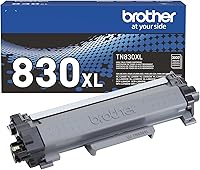
The Brother Genuine TN830 is rated for up to 1,200 pages, while the Brother TN830XL is rated for up to 3,000 pages.
Printing itself also affects how long a cartridge lasts. Light text pages use less toner than full-bleed photos or heavy graphics.
Leaving the printer on standby for long stretches is fine; a laser printer's idle time doesn't dry the toner the way an inkjet's does.
For a fuller look at yield and shelf life, read how long does toner last in a laser printer. It covers the difference between storage life and page life, which are often confused.
What actually goes wrong with stored toner cartridges?
Moisture, heat and physical settling are the real culprits, not drying. A cartridge kept in a damp basement or a hot garage can take on water vapor or soften its powder, and then it prints light or blotchy.
Clumping happens when fine particles stick together. The printer's toner-feed system works best with loose, free-flowing powder, so a clump can starve the drum and leave a pale streak.
A hard shake before installing breaks up most light clumps.
Heat is the second problem. A cartridge left in a car or near a heater can see its powder cake slightly.
That's why makers recommend a cool, dry spot away from sunlight. Dust is the third; a torn bag can collect fibers that show up as specks.
How should you store a spare toner cartridge?
Keep it sealed, cool and dry, and stand it upright in its box. Aim for a spot away from a heater, a window with strong sun, or a damp basement corner.
A closet shelf in a climate-controlled room works well.
Leave the foil bag intact. The bag and the box are the main barrier against humidity, so opening them early only exposes the powder.
Don't stack heavy things on the box. Crushing a cartridge can shift the internal parts and cause uneven feed later.
In a very humid climate, a sealed plastic tub with a desiccant pack adds protection; keep the cartridge in its original bag inside the tub.
Skip the refrigerator. Condensation forms when a cold cartridge warms up, and that moisture is exactly what you're trying to avoid.
Bring a stored cartridge to room temperature before installing it.
How do you know if a stored toner cartridge has gone bad?
Print a test page first. Install the cartridge and print a single text page.
If it comes out evenly dark, the cartridge is fine.
Faint prints, streaks or blotches mean the powder isn't feeding cleanly.
Try a gentle shake before you install it. Rock the cartridge side to side a few times to loosen settled powder.
If the first page is streaky, print two or three more; the feed sometimes needs a few pages to settle. If streaks stay after five pages, the cartridge is likely spoiled.
Signs a cartridge is truly bad include a light page across the whole sheet, a band of missing print down one side, or dark smudges from leaking powder. Replacing it is the fix.
A spoiled cartridge can't be revived by more shaking.
Never try to open the cartridge or add toner yourself. The powder is fine and irritates the lungs, and a refilled unit often leaks.
Treat a failed cartridge as a swap, not a repair.
Why does the drum unit matter more than the toner for faded prints?
The drum unit wears out before the toner in many printers, and a worn drum causes faded or repeating marks that look like toner trouble. In Brother's design, the toner and drum are separate parts that work as a pair.
The Brother Genuine DR830 Drum Unit is rated for up to 15,000 pages, far more than a toner cartridge. So if your prints fade after you just installed fresh toner, the drum is the likely cause.
A worn drum can't hold a clean charge, and the page comes out pale or marked.
Check the printer's supply status or its app first. If the toner shows full but prints are weak, the drum needs replacing.
Owners who track supplies in the Brother Mobile Connect app can check toner levels from a phone when the printer is connected wirelessly. Marks that repeat at regular intervals down the page are a drum pattern, not a toner fault.
What about the fuser and the paper?
The fuser, not the toner, is what sets the print, and worn fusers or damp paper can mimic a "dried-out" cartridge. Both are worth checking before you blame the toner.
Damp paper is a common cause of faded or smudged prints. Paper absorbs moisture from the air, especially in a humid room.
Store paper in its wrapper, and keep it in a dry spot. If you print on thick stock often, read can laser printers print on cardstock before you blame the cartridge.
A worn fuser leaves prints that smudge when you rub them. If the print wipes off the page easily, the fuser isn't melting the toner properly.
That's a printer repair, not a cartridge issue. Most laser printers report a fuser problem directly, so you don't have to guess.
How many pages should you expect from a cartridge?
Plan on the rated page yield, which for the Brother TN830 is up to 1,200 pages and for the TN830XL up to 3,000 pages. Real-world counts land close to those numbers on standard text pages.
Heavy graphics, dense fonts and large photos use more toner per page. A page full of black blocks can cut the count sharply.
Text documents with normal margins come closest to the rating, which assumes about 5 percent coverage. For a closer look at what changes the count, see how many pages does a toner cartridge print.
If you print a lot, the high-yield TN830XL is the better buy per page. Its lower cost per page and fewer replacements make it the practical choice for a busy home office.
A standard cartridge suits lighter, occasional printing.
Is laser printer toner expensive to keep as a spare?
A spare cartridge is only worth keeping if you'll use it within its shelf life, so don't stock up beyond about 2 to 3 years of printing. Toner costs more up front than ink, but each cartridge prints far more pages.
Per page, a high-yield laser cartridge often costs less than inkjet ink. The catch is the larger upfront cost and the risk of a spare sitting too long.
Buy a spare when you find a good deal and you print regularly. Skip the stockpile if your printer is light-duty and a single cartridge lasts a year or more.
For a full cost breakdown, read is laser printer toner expensive. It compares cost per page across cartridge types and printer classes.
The bottom line on toner drying out
Laser printer toner cartridges don't dry out, so a sealed spare is still usable long after you buy it. The thing to protect against is moisture and heat, which clump the powder and cause faded prints.
Store spares in a cool, dry spot and shake a cartridge before installing it.
If fresh toner prints faint, the drum or the paper is the more likely cause. Pick the Brother DR830 drum unit when the toner is full but pages stay pale.
Buy the standard TN830 for light printing and the high-yield TN830XL when you print a lot. Store it well, test it with one page, and replace it only when the print stays weak.
Frequently asked questions
Is it safe to use toner that has sat in a closet for a long time?
In most cases, yes. Toner is a dry powder, so time alone doesn't spoil it.
Check the box for a use-by date, shake the cartridge before installing it, and run a test page.
If prints come out streaky after a few pages, replace the cartridge.
Why does a toner cartridge get clumpy?
Clumps come from moisture, heat or long storage in a humid spot. The powder absorbs water and sticks together, so it doesn't flow evenly onto the page.
Keeping spares sealed in a cool, dry place prevents most clumping.
Does a sealed toner cartridge last longer than an open one?
Yes. The foil bag and box keep moisture and dust away from the powder.
An open cartridge left in a damp room takes on water faster.
Leave the seal in place until you're ready to install the cartridge in the printer.
Can I put a damp toner cartridge in the printer to test it?
Don't. A cartridge that took on water can clump inside the printer and leave streaks.
Let it sit at room temperature in a dry spot for a day, shake it gently, then try it.
If the prints stay light or blotchy, replace it.
Does toner go bad the way inkjet ink does?
Not the same way. Inkjet ink is a liquid that dries in the nozzles and the bottle.
Toner is a powder, so it doesn't evaporate.
It only loses quality when moisture or heat makes the particles stick together.