How Long Does Toner Last in a Laser Printer?
Toner lasts until the cartridge runs low, and its page life depends mainly on the cartridge's rated yield and how much toner each page uses. A cartridge can also sit unused longer than ink, but storage conditions and the printer's guidance still matter.
On this page (9 sections)
- How long does toner last in a laser printer?
- What changes how many pages a toner cartridge prints?
- How can you estimate when a cartridge will run out?
- Which cartridge yield suits your printing volume?
- Does toner expire when you rarely print?
- What should you check when pages start looking faint?
- How long does a laser printer drum last?
- How can you make toner last longer?
- How long does toner last in a laser printer for your home?
Toner lasts in a laser printer until the cartridge runs low, and the number of pages depends on the cartridge yield and your print coverage. A page of plain text uses less toner than a page filled with dark graphics, so the advertised page count is a planning estimate.
Toner powder also does not dry out like liquid ink. If you print only now and then, the cartridge may remain usable between print jobs, though storage directions and printer warnings still apply.
How long does toner last in a laser printer?
Toner cartridge life is measured in pages, not a fixed number of months or years. The cartridge's rated yield gives you a starting point, while page coverage and print settings affect how quickly you reach it.
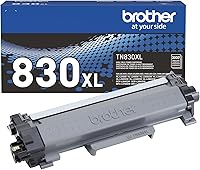
For example, Brother rates the TN830 standard yield cartridge for up to 1,200 pages and the TN830XL high yield cartridge for up to 3,000 pages. Those figures follow ISO/IEC 19752 for Letter or A4 pages, so your results can vary with the content you print.
If you know your usual pages per month, divide the rated yield by that number for a rough estimate. At 100 pages each month, a 1,200-page cartridge could represent about 12 months of printing at the standard used for its rating.
That estimate is only a guide. A household printing school worksheets, forms, and mostly text may use toner differently from one printing images, bold graphics, and long documents with shaded areas.
What changes how many pages a toner cartridge prints?
The biggest factor is how much of each page is covered with toner. A page with a few lines of text generally uses less than a page with dense graphics or large filled shapes.
Print mode and page content also matter. Draft or toner-save settings may reduce toner use where available, while high-quality settings can apply more toner; check your printer's manual for the settings it supports.
Repeated jobs can add up in ways that are easy to miss. Internal reports, alignment pages, and reprints after a paper jam may all count toward the cartridge's total output.
The page yield is not a guarantee that every owner will get the same number of sheets. For a closer estimate, compare the rated yield with a month or two of your own page counts and the kinds of documents you print.
How can you estimate when a cartridge will run out?
Use the cartridge yield and your monthly page count to estimate a replacement window. Then adjust the estimate if your pages have more or less coverage than typical test pages.
- Find the cartridge's rated page yield.
- Check the printer's page counter or keep a simple monthly count.
- Divide the yield by your average monthly pages.
- Shorten the estimate if you often print graphics or dark pages.
For example, 1,200 pages divided by 200 pages a month gives a rough six-month estimate. If your pages have more toner coverage than the standard test, expect the cartridge to last less time.
A printer's toner monitor can help you prepare, but it may not map neatly to a specific number of pages remaining. If you want to understand the yield figure itself, read how many pages a toner cartridge prints.
Which cartridge yield suits your printing volume?
A standard yield cartridge suits lighter printing, while a high yield option can reduce how often you replace toner. Choose based on your printer's compatibility and your typical volume rather than the word “high” alone.
The Brother TN830 is rated for up to 1,200 pages. It fits the listed Brother monochrome printer models, including the HL-L2460DW and DCP-L2640DW.
The TN830XL is rated for up to 3,000 pages and is designed for higher-volume printing in compatible Brother monochrome printers. It may make sense if you print often and want fewer cartridge changes.
Check your exact printer model before ordering toner. The product names can look similar, but the printer must support the cartridge you choose.
Does toner expire when you rarely print?
Toner powder does not dry out like ink, so infrequent printing alone doesn't mean it has expired. Keep a spare cartridge sealed and follow the storage guidance that comes with it.
Store toner in a clean, dry place away from direct heat and moisture. Avoid opening the package until you need the cartridge, and don't leave it in a hot car or damp area.
When installing a cartridge, follow the printer's setup steps. If pages look faint after a long idle period, check the toner level and the printer's troubleshooting guidance before replacing parts.
What should you check when pages start looking faint?
Check the toner level, print settings, and cartridge installation first. Faint output can signal low toner, but a setting or printer issue may also affect how dark the page looks.
Print a test page or the printer's status report if its manual recommends one. Confirm that toner-save mode is off if you need darker output, and make sure the cartridge is seated as directed.
Don't assume every print defect means the toner is empty. Lines, smudges, or repeated marks may point to cleaning or another part of the print system; how to clean a laser printer covers routine cleaning steps.
If the printer shows a drum warning, that is separate from a toner low message. See what “Drum End Soon” means on a Brother printer before buying another toner cartridge.
How long does a laser printer drum last?
A drum unit is a separate part from the toner cartridge, and its rated yield can be much higher. Brother rates the DR830 drum unit for up to 15,000 pages, and says it works with TN830 and TN830XL toner cartridges.
That yield is also an estimate, and the drum may need replacement at a different time than the toner. Follow the printer's displayed maintenance message and model-specific instructions.
Replacing toner won't clear a drum message if the drum unit is the part that needs attention. Keep the printer's manual nearby so you can identify which part the warning refers to.
How can you make toner last longer?
Print only the pages you need and use toner-saving settings when they suit the job. These small choices can reduce waste without changing the cartridge itself.
Use print preview to avoid blank or unwanted pages, and choose grayscale for documents that don't need color if your printer supports it. For drafts, select an economy setting when available, then switch to normal quality for final copies.
Consider duplex printing for longer documents if your printer supports it. It saves paper, although it does not reduce the toner needed to print each side.
If lower running costs are a larger concern, compare laser printing with tank printers in laser printer vs EcoTank costs over time. For general home use, whether a laser printer is worth it depends on what and how often you print.
How long does toner last in a laser printer for your home?
For estimating how long toner lasts in a laser printer, start with the rated page yield, then adjust for your actual coverage and monthly volume. A standard cartridge can suit occasional printing, while a high yield cartridge may fit a busier home.
Choose the TN830 if its 1,200-page rating matches your needs and your printer is compatible. Choose the TN830XL if you print more and prefer a cartridge rated for up to 3,000 pages.
Treat page yields as estimates, track your own printing, and use the printer's messages to plan replacement. If the warning names the drum, check the drum guidance before ordering toner.
Frequently asked questions
How long does toner last in a laser printer?
Toner lasts for as many pages as the cartridge can print at your coverage level. A cartridge rated for 1,200 pages may run out sooner if you print pages with large dark areas, while lighter documents can use less toner.
Track your own page count to estimate replacement timing.
Does toner expire if it is not used?
Toner is a dry powder, so it does not dry out like liquid ink. Still, follow the cartridge maker's storage directions and your printer's guidance, and keep a spare sealed and away from heat, moisture, and dust.
Why does my toner run out faster than expected?
High coverage, frequent graphics, and test pages can use toner faster than a simple text page. A cartridge's stated yield is an estimate under a defined standard, not a promise for every household.
Compare your printing habits with the yield method and check printer settings.
Can a laser printer say toner is low before the cartridge is empty?
Yes. A low-toner warning is a prompt to prepare for replacement, and some printers may continue printing for a time.
Follow your printer's screen or manual, especially if pages become faint or uneven, and avoid shaking a cartridge unless the instructions allow it.