How Many Pages Does a Toner Cartridge Print?
A toner cartridge’s page yield is an estimate under a standard test, not a promise for every job. The number of pages you get depends on the cartridge, the amount of toner each page uses, and your print habits.
On this page (8 sections)
- How many pages does a toner cartridge print?
- What does a toner cartridge page-yield number mean?
- Why can actual toner yield be lower than the rated yield?
- How do standard and high-yield toner compare?
- How can you estimate how long toner will last?
- Does a printer's toner estimate show the exact number of pages left?
- When should you replace toner instead of troubleshooting?
- Which toner cartridge should you choose?
A toner cartridge’s page yield is an estimate under a standard test, not a promise for every job. The number of pages you get depends on the cartridge, how much toner each page uses, and your print habits.
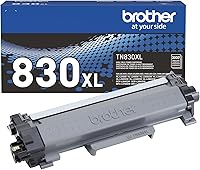
For example, Brother rates its TN830 standard cartridge for up to 1,200 pages and the TN830XL high-yield cartridge for up to 3,000 pages. Those figures use the ISO/IEC 19752 standard for Letter and A4 paper, so pages with heavier coverage can use toner faster.
How many pages does a toner cartridge print?
A toner cartridge prints up to its stated page yield under the test conditions used to rate it. A standard cartridge may be rated for around 1,000 to 1,500 pages, while a high-yield version can be rated for several thousand, but check the exact cartridge rather than assuming a range applies to yours.
Brother’s TN830 is rated for up to 1,200 pages, and its TN830XL is rated for up to 3,000 pages. The TN830XL two-pack is rated for up to 3,000 pages per cartridge, or up to 6,000 pages total.
A stated yield helps you compare cartridge options. It doesn't tell you exactly how long one will last in your home, because your documents may use more toner than the standard test pages.
What does a toner cartridge page-yield number mean?
Page yield is the number of pages a cartridge is rated to print under a defined measurement method. Brother says the yields for these cartridges are approximate and follow ISO/IEC 19752 for Letter and A4 paper.
The standard makes cartridge yields more comparable than guesses based on a box or a printer's estimate. Your results still vary with the content you print and the settings you use.
A yield figure also isn't the same as a guarantee that every cartridge will print that many pages in every situation. It's a useful comparison point, not an exact page counter for your future print jobs.
What is ISO/IEC 19752?
ISO/IEC 19752 is the standard Brother cites for estimating these monochrome toner yields. It sets a consistent way to measure a cartridge’s page output on Letter or A4 paper.
The test figure gives you a common basis for comparing a standard cartridge with a high-yield one. It doesn't mean your pages have the same amount of text, graphics, or toner coverage as the test pages.
Why can actual toner yield be lower than the rated yield?
Actual yield can be lower when your pages cover more of the paper with toner than the test pages do. Full-page graphics, bold text, charts, and dark backgrounds use more toner than ordinary text with wide margins.
Draft or toner-save settings can reduce toner use if your printer offers them and the lighter output works for your document. For forms and graphics where dark, crisp marks matter, keep the print quality you need and plan for a shorter cartridge life.
Frequent short print jobs can also affect how much toner is used over time. If your printer prints a startup or maintenance page, that toner contributes to the cartridge's total use.
If the pages start showing streaks or uneven areas, toner may not be the only cause. Our guide to Brother printer black streaks on paper covers common causes and next steps.
How do standard and high-yield toner compare?
A high-yield cartridge is rated to print more pages before replacement than a standard-yield cartridge. In this Brother example, the TN830 is rated for up to 1,200 pages, compared with up to 3,000 pages for the TN830XL.
The standard TN830 may suit occasional printing if you don't want to buy a higher-capacity cartridge at once. The TN830XL may fit a home office or household that prints more often and wants fewer cartridge changes.
A two-pack can make sense if you expect to use two high-yield cartridges over time. Brother rates the TN830XL two-pack for up to 3,000 pages per cartridge, or up to 6,000 pages total.
Before ordering, confirm the cartridge model is compatible with your printer. These TN830-series cartridges are intended for specific Brother monochrome laser printers, and printer compatibility varies by model.
How can you estimate how long toner will last?
Divide the rated yield by the number of pages you print each month for a rough estimate. A 1,200-page cartridge at 100 pages per month suggests about 12 months at the rated yield.
Use your printer's actual monthly page count if you can find it in its settings or status reports. If you print many graphics or dark pages, expect your cartridge to run out sooner than the simple calculation suggests.
A rough estimate is enough to decide whether a standard or high-yield cartridge fits your habits. The guide to how long toner lasts in a laser printer explains how storage and printer use affect toner over time.
Does a printer's toner estimate show the exact number of pages left?
No, a printer's toner estimate is a guide, not a precise count of pages remaining. It may show toner level or a low-toner warning, but the number of pages you can still print depends on what you print next.
A text page with wide margins and a dense page of graphics won't use the same amount of toner. Keep a replacement ready if a low-toner warning appears before an important print job.
On compatible Brother wireless printers, the Brother Mobile Connect app can monitor toner usage. App availability depends on the printer model, and the HL-L2400D isn't compatible with the app.
When should you replace toner instead of troubleshooting?
Replace the cartridge when it is empty or print quality stays poor after you follow your printer's troubleshooting steps. A warning alone may not mean the cartridge is fully empty, so check your model's instructions for what to do next.
Faded output can also come from settings, a poor connection, or another printer part. If the printer reports a drum message, read what Brother Printer Drum End Soon means before deciding that toner is the problem.
Cleaning can help with dust or debris inside the printer, but follow the model's manual and avoid touching sensitive parts. See how to clean a laser printer for a careful process.
Which toner cartridge should you choose?
For the question of how many pages a toner cartridge prints, use the rated yield as a comparison, then match the cartridge to your monthly volume and printer model. The TN830 is rated for up to 1,200 pages; the TN830XL is rated for up to 3,000; and the two-pack is rated for up to 6,000 total.
Choose the standard TN830 if your print volume is modest and a lower-capacity cartridge suits your routine. Choose one TN830XL for more pages between replacements, or the two-pack if you'll use both cartridges and want to keep a spare.
Related: how long toner lasts in a laser printer and Brother printer black streaks on paper.
Frequently asked questions
How many pages does a toner cartridge print?
A toner cartridge prints the number of pages in its stated yield only under the test conditions used to measure it. The Brother TN830 is rated for up to 1,200 pages, while the TN830XL is rated for up to 3,000 pages per cartridge.
Text coverage, graphics, and printer settings can change your actual total.
Does high-yield toner print more pages?
Yes. A high-yield cartridge contains toner for more pages than a standard-yield version in the same cartridge family.
For example, Brother rates the TN830XL for up to 3,000 pages and the TN830 for up to 1,200.
Check that your printer supports the exact cartridge before choosing.
Why did my toner run out before its page yield?
The yield is measured under a defined standard, while your pages may use more toner than the test pages. Large graphics, bold text, repeated images, and frequent printing can reduce the number you get.
A printer's toner estimate may also change as it updates its reading of the cartridge.
How can I estimate how long toner will last?
Divide the cartridge's rated page yield by your average pages printed per month to get a rough number of months. For example, a 1,200-page cartridge at 100 pages a month works out to about 12 months under the rated conditions.
Your real interval may be shorter if pages use more toner.