Brother Printer Black Streaks on Paper: Causes and Fixes
Brother printer black streaks on paper often point to toner buildup, a dirty drum or corona wire, or damaged supplies. Check the streak pattern, clean only the parts your manual allows, and replace a drum or toner cartridge only when the evidence points to it.
On this page (7 sections)
- What do black streaks from a Brother printer look like?
- What should you check before cleaning the printer?
- Can a dirty drum or corona wire leave a black line?
- How can you tell if the drum needs replacement?
- What if the streaks continue after cleaning?
- How do you prevent black streaks from returning?
- Which fix should you try for Brother printer black streaks on paper?
Brother printer black streaks on paper often point to toner buildup, a dirty or worn drum, a dirty corona wire, or damaged paper. Check the shape and position of the marks first, then use the cleaning steps in your model's manual before replacing a part.
A dark line that repeats down the page suggests checking the drum or toner path. Scattered smudges may point to loose toner or debris, while a wide band can also come from paper or a part that needs service.
What do black streaks from a Brother printer look like?
The streak pattern helps narrow down what to inspect, but it doesn't identify a failed part by itself. Note whether the mark runs vertically, crosses the page, repeats at regular intervals, or appears as a smudge.
Print one more page on plain paper to see if the mark repeats. If it does, compare its position and shape with your printer's troubleshooting guide; stop printing if toner is spilling inside the machine.
A streak can come from the toner cartridge, drum unit, corona wire, paper path, or the paper itself. Use the printer's screen messages and manual alongside the printed pattern, since Brother models have different parts and cleaning procedures.
If your printer displays a drum warning, our guide to Brother printer Drum End Soon messages explains what that notice means and what to check.
What should you check before cleaning the printer?
Check the paper, cartridge seating, and printer messages before opening the machine. Turn the printer off and let it cool as directed in its manual.
Try a fresh sheet of clean, dry paper from a different part of the pack. Damp, dusty, curled, or damaged sheets can carry marks through the paper path.
Check that the paper type and size match the printer's settings. If the streak appears only on one paper pack, switch packs before changing printer supplies.
Look at the printer display or software for a toner or drum message. A warning tells you what the printer has detected, but a streak can have another cause.
Could the toner cartridge be causing black streaks?
A loose, damaged, or leaking toner cartridge can leave black marks. Remove and reseat it only as your model's manual instructs, keeping it level and avoiding contact with exposed parts.
Look for loose toner around the cartridge, but don't touch or wipe parts that the manual says to avoid. If you see spilled toner, use the cleanup steps Brother gives for your model; don't use a household vacuum unless Brother says it is safe.
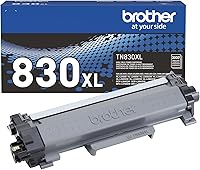
The Brother Genuine TN830XL High Yield Toner 2-Pack fits readers whose compatible printer needs TN830XL toner and who want a spare cartridge available. It is a toner supply, so it won't fix a dirty or worn drum.
Check your printer model against the cartridge compatibility information before buying. The TN830XL is listed for select Brother monochrome laser printers, not every Brother printer.
For expected cartridge life, see how long toner lasts in a laser printer and how many pages a toner cartridge prints. Page yield varies with print coverage and use.
Can a dirty drum or corona wire leave a black line?
Yes, dirt or wear on the drum unit or corona wire can cause repeated marks. Follow your printer's manual for drum cleaning, and avoid touching the drum surface.
Some Brother models use a sliding tab to clean the corona wire. Move it only as the manual describes, then return the tab to its home position before reinstalling the assembly.
Don't use water, alcohol, sprays, or a cloth on the drum unless Brother specifically instructs you to. The drum surface can be damaged by contact, so don't rub it to remove a mark.
The Brother DR830 Drum Unit is for compatible monochrome models that use DR830 and TN830-series toner. Brother says it works with TN830 and TN830XL toner and is designed for consistent toner distribution.
Confirm the exact printer model before ordering. A drum unit and toner cartridge are separate supplies, so replacing one won't correct a problem caused by the other.
For the full cleaning process, follow how to clean a laser printer. Keep to the steps for your exact model, especially around the drum and transfer area.
How can you tell if the drum needs replacement?
Consider replacing the drum when the printer shows a drum message or streaks remain after the approved cleaning. Check the manual for how to clear or confirm the drum status on your model.
Repeated marks at the same location can make the drum worth inspecting, but the pattern alone isn't proof that it has failed. Look for Brother's replacement instructions and confirm that the part number matches your printer.
The Brother DR229CL Drum Unit is intended for listed Brother color laser models, including the HL-L3220CDW and MFC-L3780CDW. It is not a general replacement for every Brother printer.
Brother describes the DR229CL as working with specific HL and MFC color models. Check the full compatibility list and your printer model before buying; don't use it in place of a DR830.
What if the streaks continue after cleaning?
Stop and check the manual or contact Brother support if the streaks continue after the approved cleaning steps. A damaged part, toner spill, or fault that needs service may be beyond routine maintenance.
Don't keep printing if toner is leaking into the machine or the paper path is damaged. Avoid taking apart assemblies that the manual doesn't tell you to remove.
If the streaks only happen on one paper type, try plain paper that meets your printer's requirements. If they appear on every page, note the pattern and any screen messages before contacting support.
How do you prevent black streaks from returning?
Use paper that is clean and dry, keep supplies seated correctly, and clean only the parts your manual identifies. Store toner and drum units as their instructions direct.
Don't touch the drum surface when changing supplies. Keep the printer's paper path clear and use the manual's maintenance schedule for your model.
If the printer uses separate toner and drum parts, track their messages separately. Our guide to Brother Drum End Soon messages covers the drum warning, while the laser printer cleaning guide walks through routine care.
Which fix should you try for Brother printer black streaks on paper?
For Brother printer black streaks on paper, start with fresh paper and the printer's messages, then inspect toner and clean the drum or corona wire only as the manual allows. Replace a supply only after checking that it matches your model and the marks point to it.
Choose TN830XL toner if your compatible monochrome printer needs that cartridge. Choose DR830 or DR229CL only for the specific printer models they support.
If cleaning doesn't resolve the marks, use Brother's troubleshooting steps or contact support with a sample page and the printer's model number. That evidence can help narrow down the next repair step.
Frequently asked questions
Why is my Brother printer leaving black streaks on paper?
Black streaks often come from toner buildup, a dirty or worn drum, a dirty corona wire, or damaged paper. Look at whether the mark repeats down the page, runs across it, or appears as scattered smudges, then check the printer's manual for the matching cleaning steps.
Streak patterns can narrow the cause, but don't prove which part has failed.
Can low toner cause black streaks?
Low toner more often causes faint or uneven printing than a dark streak, but a damaged or poorly seated cartridge can leave marks. Remove and reseat the cartridge only as the manual directs, and check it for visible toner spills.
If streaks continue, inspect the drum and paper path instead of replacing toner based on the warning alone.
How do I clean the drum on a Brother printer?
Follow the manual for your exact model, since drum and corona-wire cleaning steps vary. Many Brother printers have a drum cleaning procedure that uses the corona-wire tab, but avoid touching the drum surface or using liquids unless the manual specifically says to.
If the streak remains after the approved cleaning, the drum may need replacement.
Should I replace toner or the drum for black streaks?
Use the streak pattern and the printer's messages to decide what to inspect first. Reseat toner if it is loose or visibly leaking; clean the drum or corona wire only by the manual's method.
Replace a drum when the printer indicates it is due or the marks persist after safe cleaning, and confirm the replacement matches your printer model.