Is Canon a Good Printer Brand?
Yes, Canon is a good printer brand for most home laser buyers. Its black and white models hit 30 pages per minute with automatic duplex and widely stocked genuine toner, though the cheapest color models cost more to run.
On this page (8 sections)
- What makes Canon a good printer brand?
- Is Canon good for black and white printing?
- What should you know before buying a Canon laser?
- Which Canon printer suits a home office?
- Can Canon handle color printing too?
- How does Canon compare with Brother?
- Where does Canon fall short?
- So, is Canon a good printer brand to buy?
Is Canon a good printer brand? Yes, for most home and home office buyers, especially if you print black and white documents.
Canon's laser line pairs fast print speeds with automatic duplex and genuine toner that's easy to replace.
The brand covers a wide range, so the answer shifts by model. A compact mono printer and a color single-function laser sit in the same family but suit very different budgets and workloads.
This guide walks through where Canon earns its reputation and where another brand might fit you better.
What makes Canon a good printer brand?
Canon's biggest strength is a deep, well-organized model range. The imageCLASS line runs from small print-only units to multifunction machines that scan and copy, so you can usually find one that matches your desk and your page count.
Canon also builds its own toner and print engines rather than reselling another maker's hardware. That shows up in details like a 5.3 second first page out and consistent 30 pages per minute on the mono machines.
The brand's support network is another point in its favor. Home models typically carry a 1-year limited warranty, and Canon's service arm handles repairs and replacements directly rather than pushing you to a retailer.
That combination of range, engine consistency and support makes Canon a low-risk pick for a first laser printer. The catch is that not every model in the line is priced to match its speed.
Canon also lists a 1-year spare part availability window on these models, which tells you how long the brand plans to keep replacement parts on hand after launch.
Is Canon good for black and white printing?
Yes, black and white is where Canon lasers make the most sense. The mono models are built around office documents, so text comes out sharp and pages land quickly.
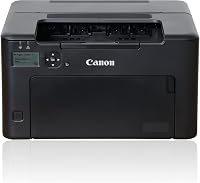
The imageCLASS LBP122dw prints up to 30 pages per minute in black and white. Its first page appears in about 5.3 seconds, so short print jobs don't leave you waiting at the machine.
Automatic duplex is standard, which halves paper use on longer documents.
The 150-sheet paper capacity suits a single home user. Canon's GENUINE Toner 071 and 071 H cartridges feed the printer, and the high-capacity version stretches the gap between replacements.
A 12.4 pound body means it fits on a small desk without crowding your monitor. The starter cartridge in the box yields about 700 pages, which covers the first few months of light printing before you buy a replacement.
If you only print occasionally, the compact size matters more than raw speed. Canon's smallest mono models trade a little capacity for a footprint that slips into a corner.
Read our Canon LBP6030w review to see how the entry-level end of the line compares.
What does the LBP122dw actually print well?
Plain text documents, invoices, packing slips and homework come out crisp on a mono laser like the LBP122dw. It's a print-only machine, so there's no scanner or copier in the box.
The Canon PRINT app and Amazon Alexa control mean you can send a job from a phone without walking to a computer.
What should you know before buying a Canon laser?
Check the toner model and duplex support first, because they decide the real running cost. A printer that's cheap to buy can be expensive to feed if its cartridges cost more per page.
Every Canon laser names a toner family in its specs. The mono machines use GENUINE Toner 071 and 071 H, while the color single-function model uses GENUINE Toner 075.
Genuine cartridges are stocked widely, so you won't hunt for replacements.
Automatic duplex is worth having on any home laser. Our explainer on what duplex means on a printer covers how it saves paper and when manual flipping still makes sense.
Also match the machine to your workflow. A print-only unit is fine if you never scan.
A 3-in-1 model costs more but replaces a separate flatbed scanner on your desk.
Finally, think about connectivity. Canon's wireless models pair with the Canon PRINT app and support mobile printing, which helps in a shared home office.
Check which ports the model you're eyeing offers, since some units list Ethernet while others rely on USB or wireless only.
Which Canon printer suits a home office?
The imageCLASS MF273dw fits most home offices that need scanning and copying alongside printing. It's a 3-in-1 machine with print, copy and scan in one box.
The 30 pages per minute rating matches the mono speed of the LBP122dw. First page out is about 5.3 seconds, and automatic duplex is included.
The auto document feeder means you can copy or scan a multi-page stack without lifting the lid each time. Copy speed matches the print speed at 30 pages per minute, so the scanner keeps up with the engine.
The 24.7 pound weight and 14.6 by 15.4 inch footprint make it a desk or shelf machine rather than a pocket printer. Print resolution reaches 2400 x 600 dpi, which is plenty for text and line art.
The 8.5 x 14 inch maximum media size covers legal paper, useful for contracts and statements.
If you only print and already own a scanner, the MF273dw's extra functions add cost and bulk for little gain. The print-only LBP122dw is the leaner choice in that case.
Can Canon handle color printing too?
Yes, Canon's color laser models handle crisp color documents and basic graphics. The Color imageCLASS LBP646Cdw prints up to 26 pages per minute in both color and monochrome.
The 250-sheet cassette plus a 1-sheet multipurpose tray gives more paper capacity than the mono models. A 5-line LCD screen walks you through setup and settings.
Canon's GENUINE Toner 075 cartridges feed it, and the high-capacity versions keep replacements spaced out. The starter set ships with 500 page yields for cyan, magenta and yellow and 700 pages for black.
Setup is wireless and works with the Canon PRINT app, Apple AirPrint and Mopria. The printer is ENERGY STAR rated and EPEAT Silver, so power draw stays modest for a color laser.
It also lists Ethernet and USB interfaces, so you can wire it to a network or a single machine if wireless is unreliable.
Color lasers are not photo printers, though. Our guide on whether laser printers are good for photos explains why an inkjet still wins for glossy prints.
For color documents, flyers and charts, the LBP646Cdw is a strong fit. The first page lands in about 10.3 seconds, which is slower than the mono models but still quick for color.
How does Canon compare with Brother?
Canon tends to lead on speed and color options, while Brother covers more budget mono models. The right answer depends on which machine you're actually comparing.
Canon's mono line runs at 30 pages per minute across several models, with duplex standard. Brother's black and white lasers span a wider price spread, so there's often a cheaper entry point if you print less.
Our comparison of Brother vs Canon laser printer puts the two lines side by side on speed, toner and features. The short version: pick Canon when you want a fast mono unit with duplex or a color single-function laser, and pick Brother when budget and a broad mono range matter more.
Neither brand has a clear edge in reliability for home use. Both build their own engines and support their own cartridges, so the deciding factor is usually the model's specs and toner cost.
Look at the toner family each model uses and how easy it is to buy locally before you commit.
Where does Canon fall short?
Canon's weak spots are price on color models and a thinner budget end. The mono machines are competitive, but color lasers need four cartridges and cost more to run.
The Color imageCLASS LBP646Cdw uses separate cyan, magenta, yellow and black toner. Every color page pulls from all four, so a heavy color workload raises running costs quickly.
Canon's own PIXMA inkjets handle photos better for less.
Canon's entry-level mono options also compete against cheaper budget lasers from rival brands. If your only goal is occasional text printing at the lowest price, a smaller Brother or another budget brand may undercut Canon.
Some Canon models are print-only, so you need a separate scanner if you copy often. That's not a flaw in the printer, but it changes the total cost of your setup.
Print-only units have no scanning function at all, so any scanning happens on a separate device.
Warranty coverage is a 1-year limited term on most home models. That's typical for the category, but it's worth knowing before you buy.
Canon's spare part availability window is also short at 1 year, so long-term owners should plan to replace the machine rather than repair it far down the road.
So, is Canon a good printer brand to buy?
Yes. Canon is a good printer brand to buy if you want a fast black and white laser with automatic duplex and easy-to-find genuine toner.
For most home offices, the mono line is the safe pick.
Start with the imageCLASS LBP122dw if you only print. Step up to the MF273dw when you need a scanner and copier in the same box.
Choose the Color imageCLASS LBP646Cdw for color documents rather than photos.
Skip Canon if your budget is tight and you print rarely, or if photo prints matter more than documents. In those cases a cheaper mono laser or an inkjet serves you better.
The key question isn't whether Canon is a good printer brand in general. It's whether the specific model's toner, speed and functions match how you print.
Compare the specs against your page count and let the numbers decide.
Frequently asked questions
Is Canon better than Brother for a home laser printer?
Neither brand wins everywhere. Canon tends to lead on print speed and color single-function models, while Brother has a broader spread of budget black and white lasers.
Pick by the specific model and its toner cost, not the badge on the front.
Does Canon make good black and white laser printers?
Yes. Canon's imageCLASS line covers compact print-only units up to 3-in-1 machines, most at 30 pages per minute with automatic duplex.
Genuine Toner 071 is easy to find, which keeps running costs predictable.
Are Canon printers expensive to run?
It depends on the model. Canon's high-capacity toner cartridges lower the cost per page, so a 30 ppm mono printer can be cheap to feed.
Color laser models carry four cartridges, which adds up faster if you print a lot of photos.
Is Canon a good brand for color printing?
Canon's color lasers handle crisp documents and basic color pages well. For photo-quality prints on glossy paper, an inkjet from Canon's PIXMA range usually serves better than a color laser.
Where is Canon support based?
Canon backs its printers through its own service and support network, and most home models carry a 1-year limited warranty. Register the printer when you set it up so support can find your model quickly.