Are Laser Printers Being Phased Out?
No, laser printers are not being phased out. They remain the standard choice for fast, low-cost black and white pages in homes and small offices, and manufacturers keep releasing new models with duplex printing and wireless connections.
On this page (8 sections)
- Are laser printers being phased out by manufacturers?
- Why do people think laser printers are going away?
- What has actually changed for laser printers?
- Do laser printers use lasers?
- Is a laser printer still worth it for a home office?
- What should you check before buying a monochrome laser?
- How long will laser printers stay on sale?
- Which laser printer should most people buy?
No, laser printers are not being phased out. They remain the default choice for fast, cheap black and white pages, and new models keep arriving with duplex printing, wireless connections and lower running costs.
The talk about them fading comes from the inkjet side of the market, not from the people who buy printers for text.
The short version: laser printers still sell in large numbers for home offices and small teams. What has changed is the mix of models on offer, not the technology itself.
Below is what is actually happening and how to decide whether one still makes sense for you.
Are laser printers being phased out by manufacturers?
No. Major printer makers still design and sell new laser models.
Brother's current lineup includes compact monochrome units built for home offices, and the HL-L2460DW is a recent example with dual-band wireless, Ethernet and automatic duplex printing.
Laser printing is mature rather than declining. The engines are proven, the toner supply chains are established, and the format is still the cheapest way to put a lot of plain text on paper.
A manufacturer has little reason to abandon that.
What you do see is consolidation. Makers trim slow-selling models and push buyers toward the configurations people actually want, such as wireless duplex units.
That looks like a phase-out from the outside, but it is a normal product refresh.
The one real pressure is color. Cheap inkjet tanks handle color photos well, so laser has retreated from the home photo desk.
It has not retreated from the home office desk. Mono lasers like the HL-L2460DW are still sold as new machines for exactly that desk.
Why do people think laser printers are going away?
People think laser printers are disappearing because inkjet marketing is louder. Store shelves and ads push color inkjet and tank printers at consumers, so the laser aisle looks smaller than it is.
Offices also went paperless in part, which cut total page volume. Less printing overall makes any printer category look quieter.
That is a demand shift across all printers, not a verdict on laser.
Laser's own quirks feed the rumor too. Toner and drum units are separate supplies, which confuses first-time buyers.
A printer that needs two parts feels more complicated than an inkjet that needs one cartridge.
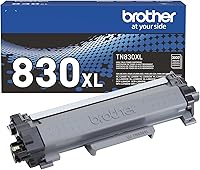
The supply list for a single mono laser shows why. The HL-L2460DW ships with an AC power cord, a drum unit and toner cartridges, and later you buy TN830 or TN830XL toner plus a DR830 drum.
Two wear items sounds like upkeep, even when both last a long time.
Finally, the used market is full of old laser units. Seeing 10-year-old models for sale makes it easy to assume the category stopped moving forward.
New monochrome lasers with mobile apps and duplex are on sale right now.
What has actually changed for laser printers?
The biggest change is connectivity. Modern monochrome lasers ship with dual-band wireless, Ethernet and USB, and many pair with a phone app for remote printing and toner tracking.
The Brother Mobile Connect app handles that on the HL-L2460DW.
Speeds have crept up too. The HL-L2460DW prints up to 36 pages per minute, which is faster than most home users need.
First-page time is 8.5 seconds, so short jobs feel quick.
Running costs have improved through high-yield toner. The Brother TN830XL yields up to 3,000 pages, so you change cartridges far less often than with a standard yield.
That math favors anyone printing more than a few pages a week.
Drum life matters as well. The Brother DR830 drum unit is rated for up to 15,000 pages, so it outlasts several toner changes.
Together, toner and drum set the real cost of ownership.
Do laser printers use lasers?
Yes, they do. A laser printer uses a laser beam to draw the page image onto a rotating drum, and toner sticks to the charged areas.
Heat and pressure then fuse the toner to the paper. If you want the full walkthrough of that process, see do laser printers use lasers.
That mechanism explains why laser pages come out crisp and smudge-free. Text edges stay sharp because toner sits on the surface rather than soaking into the fibers.
It also explains why laser printers need a drum unit as a separate part.
The parts also explain the long service life. A drum rated for 15,000 pages and toner rated for 3,000 pages are built to be replaced on separate schedules.
Each supply is changed when it wears out, not when the printer does. That is why an older laser can keep running for years with fresh supplies.
Is a laser printer still worth it for a home office?
Yes, for text-heavy work. A laser printer is worth it when most of your pages are documents, forms or labels and you want fast, sharp output that doesn't smudge.
If that describes your week, a monochrome laser is the sensible buy. Our guide to whether laser printers are worth it covers the trade-offs in more detail.
The case gets weaker for color photos, craft printing and very low volume. If you print a handful of pages a month and want color, an inkjet is the better fit.
Laser earns its keep when the page count climbs and the content stays black and white.
A cheap laser printer makes the decision easier. Entry models like the HL-L2460DW cost less than many people expect and still deliver duplex printing and wireless.
Compare options in our roundup of the best cheap laser printers before you commit.
For most homes, the honest test is simple. Count your pages for a month.
If text dominates, laser wins; if color and photos dominate, inkjet wins. The printer's own footprint can tip the decision too.
The HL-L2460DW measures about 14.2 inches deep, 14 inches wide and 7.2 inches high and weighs 15.6 pounds, so it fits on a desk without taking over the room.
What should you check before buying a monochrome laser?
Check the toner yield first, because it sets your cost per page. High-yield cartridges like the TN830XL cut the number of replacements and lower the per-page cost compared with standard yield.
Match the cartridge to the printer model before you order. The TN830XL fits the HL-L2460DW, along with a long list of other Brother mono models.
Then look at the drum rating. A drum rated for 15,000 pages means you'll swap it rarely, which keeps maintenance low.
Factor both supplies into the total cost rather than looking at the printer alone. Toner and drum are the two parts that decide what a page really costs you.
Confirm duplex printing if you print double-sided documents. Automatic duplex saves paper and time, and it is standard on many current models.
A manual feed slot also helps for envelopes and specialty paper. The HL-L2460DW pairs its 250-sheet paper tray with exactly that manual slot.
Finally, check the connection options. Built-in wireless and Ethernet mean the printer can sit wherever you have power and reach it from any device.
If you only ever print from one computer, USB is enough. The HL-L2460DW covers all three, so it fits either setup.
How long will laser printers stay on sale?
Laser printers will stay on sale for the foreseeable future. The installed base is huge, the supplies ecosystem is deep, and no major maker has announced a plan to stop.
New monochrome models continue to launch each year.
The format's long life comes from its economics. A laser printer that prints 36 pages per minute and takes a 3,000-page toner cartridge is hard to beat for bulk text.
Businesses and home offices keep buying that combination.
Expect the lineup to keep narrowing toward wireless duplex units and away from basic USB-only models. That is a change in what's offered, not an exit from the market.
The underlying technology isn't going anywhere soon.
If your old laser still works, there is no rush to replace it. Supplies like the DR830 drum unit keep older machines running for years.
Upgrade when the speed or connectivity starts to hold you back. Owners who already print on a mono laser usually only need toner and a drum now and then to keep going.
Which laser printer should most people buy?
The Brother HL-L2460DW is the pick for most homes that want a monochrome laser. It prints up to 36 pages per minute, handles automatic duplex, and connects by dual-band wireless, Ethernet or USB.
It also works with the Brother Mobile Connect app for remote printing and toner tracking. For a compact unit built for home offices, that covers the basics well.
See our roundup of the best monochrome laser printers for alternatives.
The printer for text-heavy homes
The HL-L2460DW is best for home offices and small teams that mostly print black and white documents. Its 250-sheet paper tray means fewer refills, and its 36 pages per minute output keeps text jobs moving quickly.
A first page in 8.5 seconds and 36 pages per minute keep short jobs and long ones moving.
The supplies that keep it running
When you replace supplies, stick with Brother Genuine toner and drums. The TN830XL handles up to 3,000 pages and the DR830 drum up to 15,000, so the pair keeps running costs predictable.
Buy the printer first, then budget for the toner and drum as normal wear items. The app can track toner usage and order replacements when levels drop.
Skip the mono laser if you need color or scan and copy functions in one box. In that case, look at a color laser all-in-one instead.
For pure black and white documents, a mono laser like this one is the straightforward buy.
So are laser printers being phased out? No, and the smart move is to buy one while the models and supplies are easy to find.
Pick a mono laser for text, an inkjet for color, and match the supplies to your page count.
Frequently asked questions
Will laser printers still be sold in five years?
Yes. Brother, HP and other makers still bring out new monochrome laser models, and offices keep buying them for text-heavy work.
No major brand has announced a plan to stop making laser printers.
Are inkjet printers replacing laser printers at home?
Inkjet has taken over cheap color printing and photo work. Laser still wins for plain black and white pages at volume, so the two kinds sit side by side rather than one replacing the other.
Do laser printers use more electricity than inkjets?
A laser printer draws more power while it warms up and fuses toner to paper. Between jobs it drops to a low standby draw, so the difference across a month of light printing is small.
Is a laser printer a good buy for a home office?
Yes, if most of what you print is text. A compact monochrome model like the Brother HL-L2460DW gives you fast pages, automatic duplex and toner that lasts for thousands of pages.
What should I check before buying a laser printer?
Check the toner yield and the drum life, since those two supplies set your long-run cost. Also confirm duplex printing, the paper tray size and whether wireless is built in.