Do Laser Printers Use Lasers?
Yes, laser printers use lasers. A small laser beam draws the page image onto a spinning drum, and toner sticks to the charged areas before heat fuses it to the paper.
On this page (9 sections)
- How does a laser printer actually use its laser?
- What do the drum and toner do after the laser draws?
- Why do laser printers produce such sharp text?
- What is inside the printer that makes the laser safe?
- Do color laser printers use the same laser process?
- Is a laser printer the right choice for a home office?
- Which laser printer supplies matter most?
- What should you check before buying a laser printer?
- So, do laser printers use lasers?
Yes, laser printers use lasers. A small laser beam draws the page image onto a spinning drum, toner clings to the charged areas, and heat fuses the powder onto paper.
That light-based drawing step is what gives the category its name.
So when you ask "do laser printers use lasers," the short answer is the plain one: the laser is the core of how the page gets built. Everything else in the printer supports that single job.
The rest of this guide explains where the beam goes, what the drum and toner do, and why the result looks the way it does.
How does a laser printer actually use its laser?
The laser writes the page image onto a light-sensitive drum. A rotating mirror sweeps the beam across the drum line by line, and wherever light hits, the drum's surface changes so toner will stick there.
The drum is a coated cylinder that holds an electrical charge. A corona wire or roller gives it a uniform charge first.
Then the laser discharges the spots that should become black, leaving a hidden image made of charged and uncharged areas. Toner, which carries its own charge, is attracted to the discharged spots and repelled from the rest.
The result is a powder image on the drum that mirrors your document. Nothing touches paper yet.
This drawing step happens for every page, which is why the process is called laser printing even though the laser never touches the paper directly. The beam is fast and precise, so it can draw a full page in a fraction of a second while the drum keeps turning.
On the Brother HL-L2460DW, the first page is out in about 8.5 seconds, a speed made possible by that quick drawing step.
What do the drum and toner do after the laser draws?
The drum carries the toner image to the paper, and heat makes it permanent. Toner is a fine dry powder, not liquid ink, and it only sticks where the laser prepared the drum.
As the drum rolls against the paper, a transfer roller pulls the toner across. The sheet then passes through a fuser, a pair of hot rollers that melt the powder into the fibers.
That heat is why pages come out warm and why the print won't smudge once it cools. The drum keeps turning and gets cleaned of leftover toner before the next page starts.
The drum and toner work as a pair: the drum holds the image, and the toner is the material that becomes the print. On a monochrome machine like the {{product B0CPL2N5H6 | A compact monochrome laser printer with automatic duplex and dual-band wireless.}}, that pair handles every page.
The printer ships with a drum unit and toner cartridges already installed, so the system is ready to draw from the first job.
Why do laser printers produce such sharp text?
The laser draws at high resolution, so small letters keep clean edges. Because the beam can address tiny spots on the drum, text comes out crisp rather than slightly fuzzy.
The Brother HL-L2460DW lists a maximum copy resolution of 1200 x 1200 dpi. That density means each character is built from many small dots, which is why spreadsheets, contracts and small print stay readable.
Laser toner also sits on the surface and fuses flat, so it doesn't bleed into the paper the way liquid ink can. The printer also offers Toner Save Mode, which stretches the toner supply by laying down less powder per page when you don't need maximum darkness.
The trade-off is that laser printers are built mainly for documents. Photos and graphics often look better on an inkjet, while laser output shines on black text, tables and forms.
If crisp pages are your main need, that strength is the reason to choose laser over ink.
What is inside the printer that makes the laser safe?
The laser sits inside a sealed print unit, so you never see the beam in normal use. Covers and interlocks keep the light contained while the printer runs.
The beam is low-power and aimed only at the drum, and the whole assembly is enclosed. You only encounter the laser path when you slide out the print unit for maintenance, and even then the printer's design keeps the exposure brief.
This is also why laser printers can be used in a home office without special precautions. Keep the covers closed, follow the manual when you change supplies, and treat the print unit as a service part rather than something to open casually.
The safety story is boring in the best way: the light stays where it belongs and does its drawing job without you noticing. On the HL-L2460DW, that enclosed unit sits inside a body measuring about 14 inches deep, 14 inches wide and 7.2 inches high, so the whole light path fits on a desktop.
Do color laser printers use the same laser process?
Yes, color laser printers use the same laser-and-drum method, repeated for each color. The difference is that they carry four toner cartridges instead of one.
A color laser draws four separate images, one for black, cyan, magenta and yellow, then layers them onto the paper before fusing. That is why color laser printers cost more to run and take up more space.
The light still does the drawing, but the printer needs more drums or belts to handle multiple colors. For everyday black text, a single-color machine is simpler and cheaper.
If you're weighing the two, our guide to whether color laser printers use ink explains how color toner works and where it differs from inkjet ink.
Is a laser printer the right choice for a home office?
For most home offices that print documents, yes. A laser printer is fast, keeps text sharp and doesn't dry out between jobs the way ink cartridges can.
The trade-off is upfront cost and a bigger footprint. A compact mono model suits a desk, while larger units take more room.
The HL-L2460DW keeps its footprint small enough for a desktop, and its 250-sheet paper tray means fewer refills during a long print run. A manual feed slot adds envelopes and specialty paper without swapping the main tray.
Laser printers also handle long idle stretches well, so a printer you use a few times a week stays ready. If you print photos or lots of color, an inkjet may fit better.
For forms, invoices and school papers, the laser's speed and text quality are hard to beat. Our guide to whether laser printers are worth it walks through the cost side for a typical home.
Which laser printer supplies matter most?
Toner and the drum are the two supplies that keep a laser printer running. Toner runs out first, and the drum lasts much longer.
The toner cartridge
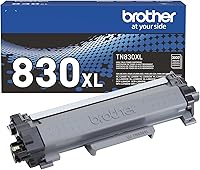
The {{product B0BX2G5K2G | A high-yield black toner cartridge rated for up to 3,000 pages.}} fits the HL-L2460DW and other Brother mono models. High-yield cartridges mean fewer swaps and a lower cost per page than standard toner.
The printer lists the TN830 standard cartridge as an option too, alongside the TN830XL and a two-pack of the high-yield version. When you use a wireless connection, the Brother Mobile Connect app can track toner usage and order replacements remotely.
The drum unit
The {{product B0CPMDDTGX | A genuine drum unit rated for up to 15,000 pages.}} handles the image-transfer job over many toner changes. Because its yield is roughly five times a high-yield toner cartridge, you will replace toner several times before the drum needs attention.
Brother's recycling program takes used drum units back so they stay out of landfills. Buying genuine supplies matters more on a laser than many people expect, because the drum and toner are engineered to work together.
If you're shopping on a budget, our roundup of the best cheap laser printers shows where to start without overspending.
What should you check before buying a laser printer?
Check the print resolution, the paper tray size and the supplies it takes. Those three details decide whether a printer fits your desk and your monthly page count.
Resolution tells you how sharp small text will be. Tray capacity tells you how often you'll refill paper.
The supply model matters because toner and drum costs add up over the printer's life. A compact mono printer with a 250-sheet tray and duplex printing covers most home office needs.
Speed is worth a look too: the HL-L2460DW prints up to 36 pages per minute and duplexes automatically, so long documents finish quickly and use less paper. Connection options decide where the printer can sit, and this model offers dual-band wireless, Ethernet and USB.
If you want a shortlist, our guide to the best monochrome laser printer compares models on exactly these points. Match the printer to your page volume first, and the supply costs become easy to plan.
So, do laser printers use lasers?
Yes. The laser is the light source that draws each page onto the drum, and that drawing step is why the category carries the name.
Toner and heat finish the job, but the beam starts it. If you mainly print black text and want sharp, fast pages, a mono laser like the Brother HL-L2460DW is a sensible place to begin.
Keep genuine toner and a drum unit on hand so the printer stays ready. For more on choosing one, see our roundup of the best monochrome laser printers.
Frequently asked questions
Is the laser in a printer dangerous to be near?
No. The laser sits inside a sealed print unit, and the light is only exposed when you remove that unit for service.
Follow the manual's instructions and keep the printer's covers closed during use.
Why is a laser printer called a laser printer if it uses toner?
The name comes from the light source that draws the page. Toner is the powder that gets fused to the paper, but the laser is what patterns the drum, so the printer takes its name from that step.
Do laser printers use ink at all?
No. A laser printer uses dry toner powder, not liquid ink.
Inkjet printers spray ink, while laser printers transfer and fuse toner, which is why the two need different supplies.
Can a laser printer print in color?
Yes, color laser printers exist. They use four toner cartridges (black, cyan, magenta and yellow) and the same laser-and-drum process, just repeated for each color.