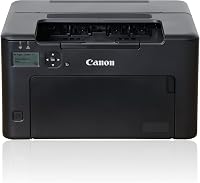
Canon LBP6030w Review: Small and Simple (October 2026)
The Canon imageCLASS LBP6030w suits basic black-and-white printing in a small space. It prints up to 19 pages per minute, holds up to 150 sheets and does not print on both sides automatically.
On this page (8 sections)
- Canon LBP6030w review: what does it offer?
- How does the LBP6030w compare with alternatives?
- Is the LBP6030w fast enough for your printing?
- Will the LBP6030w fit your desk and paper routine?
- Does this Canon printer handle two-sided printing?
- What should you know about toner and energy use?
- What are the main trade-offs?
- Should you choose the Canon LBP6030w?
The Canon imageCLASS LBP6030w is a compact choice for simple black-and-white printing. It prints up to 19 pages per minute, holds up to 150 sheets and supports wireless printing from a compatible mobile device.
Its limits are clear: it prints only, has no automatic duplex function and runs slower than the alternatives here. Choose it for basic documents where space matters; compare the Brother HL-L2405W for speed or the Canon LBP122dw for automatic two-sided printing.
Canon LBP6030w review: what does it offer?
The LBP6030w offers compact, print-only monochrome output for home, school or a small office. Its dimensions are 9.8 in deep, 14.3 in wide and 7.8 in high, and it weighs 11 lb.
Canon imageCLASS LBP6030w: Best for compact print-only use
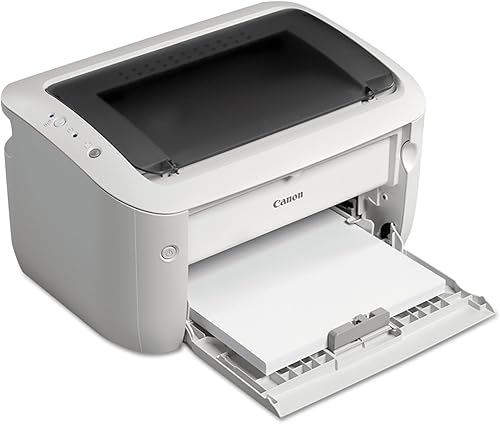
- Print only
- Up to 19 pages per minute
- Up to 150-sheet capacity
- Canon Genuine Toner 125, 1,600-page yield
A compact monochrome wireless printer for straightforward home or personal office jobs. It has no automatic duplex printing or scanning.
Pros
- Compact 9.8 x 14.3 x 7.8 in dimensions
- Wireless printing from a compatible mobile device
- Up to 150 sheets of paper
- Energy Saver mode uses less than 2 watts
Cons
- Print only, with no scanner or copier
- No automatic two-sided printing
- 19 pages per minute is slower than the alternatives here
Canon specifies speeds up to 19 pages per minute and a paper capacity of up to 150 sheets. The printer uses Canon Genuine Toner 125, which has a stated yield of 1,600 pages.
Wireless printing from a compatible mobile device is included. Its listed hardware interfaces are USB and USB 2.0, so review your device and connection needs before choosing it.
Who is the Canon LBP6030w best for?
It fits a person who prints black-and-white documents and wants a small machine for a desk or shelf. The 150-sheet capacity can handle regular light use, while the print-only design keeps the job focused on paper output.
It is less suitable if you need scanning, copying or automatic two-sided printing. Consider how often you print long documents too: 19 pages per minute is adequate for modest jobs, but a faster model can reduce waits when printing larger batches.
How does the LBP6030w compare with alternatives?
The LBP6030w is the smallest of these choices by stated dimensions, while the other two offer speeds up to 30 pages per minute. The Canon LBP122dw adds automatic duplex printing, and the Brother HL-L2405W has a larger 250-sheet tray.
| Detail | Canon LBP6030w | Brother HL-L2405W | Canon LBP122dw |
|---|---|---|---|
| Function | Print only | Print only | Print only |
| Stated speed | Up to 19 pages per minute | Up to 30 pages per minute | Up to 30 pages per minute |
| Paper capacity | Up to 150 sheets | 250-sheet tray | Up to 150 sheets |
| Duplex | No automatic duplex | Manual duplex | Automatic duplex |
| Wireless | Compatible mobile-device printing | Dual-band wireless | Wireless printing |
| Toner | Canon Genuine Toner 125, 1,600-page yield | Brother TN830 or TN830XL | Canon Toner 071 or 071 H |
The Brother is the speed and tray-capacity pick for a busier desk. The LBP122dw is the better fit when automatic two-sided output matters.
Is the LBP6030w fast enough for your printing?
The LBP6030w prints up to 19 pages per minute, which can work for occasional forms, school pages and household paperwork. A stated maximum is a useful comparison point, though your print job and setup can affect the time you see.
If you often print long documents, compare it with the Brother HL-L2405W or Canon LBP122dw, both rated up to 30 pages per minute. That higher stated speed may be more useful for recurring batches than for a few pages at a time.
Choose based on your typical week, not an occasional large job. A faster printer may save time when volume is routine, while the LBP6030w's compact size may matter more when printing stays light.
Will the LBP6030w fit your desk and paper routine?
Measure the space before buying. The LBP6030w's 9.8 x 14.3 x 7.8 in dimensions make it compact, but leave room to load paper and handle printed pages.
Its capacity is up to 150 sheets. That is enough for a modest home queue, but a larger tray can mean fewer refills if several people share the printer or print frequently.
Check the paper you use and the placement of the printer. Keep access to the paper path and controls clear, and follow Canon's setup instructions for ventilation and operation.
Does this Canon printer handle two-sided printing?
The LBP6030w does not offer automatic duplex printing. If you need both sides, you'll have to handle the page turn and reload yourself.
That can be manageable for a short document, but it adds steps to regular double-sided jobs. The duplex printing guide explains the difference between manual and automatic two-sided printing.
For automatic duplex, the Canon LBP122dw is the closest alternative in this set. The Brother HL-L2405W supports manual duplex, so it also requires you to turn the pages.
What should you know about toner and energy use?
Canon Genuine Toner 125 has a stated yield of 1,600 pages for the LBP6030w. Your results may differ based on how much black coverage appears on each page.
Canon says the printer uses less than 2 watts in Energy Saver mode. That is a mode-specific figure, not an estimate of total electricity use over time.
For broader context, see how long toner lasts in a laser printer and how many pages a toner cartridge prints. Both depend on print habits and the type of work you send.
What are the main trade-offs?
The LBP6030w's main strengths are its compact footprint, wireless mobile printing and straightforward black-and-white output. Its 150-sheet capacity and 19-page-per-minute speed are aimed at regular personal printing rather than high-volume shared work.
The trade-offs are the print-only function and lack of automatic duplex printing. It won't replace a scanner or copier, and frequent two-sided printing takes extra effort.
Our best monochrome laser printers guide compares other options for everyday black-and-white documents. For a Canon-focused shortlist, see best Canon laser printers.
Should you choose the Canon LBP6030w?
Choose the Canon LBP6030w if compact size and basic wireless monochrome printing matter most. Pick the Brother HL-L2405W for a faster stated speed and larger paper tray, or the Canon LBP122dw if you want automatic duplex printing.
If you need scanning or copying, look for an all-in-one printer instead. For more options at a lower-cost end of the category, compare the best cheap laser printers.
Frequently asked questions
Is the Canon LBP6030w a good printer for home use?
The LBP6030w can suit a home that needs compact, black-and-white printing and does not need scanning or copying. It prints up to 19 pages per minute, holds up to 150 sheets and supports wireless printing from a compatible mobile device.
Consider how often you print and whether you need automatic two-sided output.
Does the Canon LBP6030w print double-sided?
The LBP6030w does not have automatic duplex printing. You can print two-sided pages by manually turning and reloading the paper, but check the printer instructions for the correct method.
If you print double-sided often, the Canon LBP122dw offers automatic duplex printing.
Can the Canon LBP6030w scan or copy?
No. The LBP6030w is a print-only monochrome printer, so it does not scan or copy documents.
Choose an all-in-one model if you need to digitize paperwork or make copies without using another device.
Which toner does the Canon LBP6030w use?
The LBP6030w uses Canon Genuine Toner 125, with a stated yield of 1,600 pages. Actual yield can vary with what you print, since pages with more black coverage use toner differently from mostly blank documents.
Check cartridge compatibility before ordering a replacement.